<?xml version="1.0" encoding="utf-8"?><feed xmlns="http://www.w3.org/2005/Atom" ><generator uri="https://jekyllrb.com/" version="3.10.0">Jekyll</generator><link href="https://karay.me/feed.xml" rel="self" type="application/atom+xml" /><link href="https://karay.me/" rel="alternate" type="text/html" /><updated>2026-03-02T01:48:56+00:00</updated><id>https://karay.me/feed.xml</id><title type="html">Aray Karjauv</title><subtitle>Aray&apos;s personal page.</subtitle><entry><title type="html">Hands-on Guide to Multi-Language Speech Recognition and Speaker diarization</title><link href="https://karay.me/2023/03/31/speech-recognition-and-diarisation.html" rel="alternate" type="text/html" title="Hands-on Guide to Multi-Language Speech Recognition and Speaker diarization" /><published>2023-03-31T15:45:00+00:00</published><updated>2023-03-31T15:45:00+00:00</updated><id>https://karay.me/2023/03/31/speech-recognition-and-diarisation</id><content type="html" xml:base="https://karay.me/2023/03/31/speech-recognition-and-diarisation.html"><![CDATA[<p>Multi-Language speech recognition and speaker diarization are two important tasks in the field of audio processing. Speech recognition can be defined as the process of converting spoken language into written text, while speaker diarization involves segmenting an audio recording and assigning each segment to a particular speaker. These techniques are used in a variety of applications, including podcasts and conference transcription.</p>

<p>In this blog post, you will learn how to build a pipeline for multi-language speech recognition and speaker diarization using existing libraries.</p>

<!--more-->

<h2 id="introduction">Introduction</h2>

<p>Podcasts are a great example of how this technology can be useful. Podcasts have gained growing popularity, which has led to an increasing demand for tools capable of automatically transcribing and segmenting podcast episodes, thus saving a significant amount of time on manual work. Many podcasts are recorded with multiple speakers and are often distributed in audio format only. By using speaker diarization, podcast producers can automatically identify each speaker and generate subtitles for each one. This not only makes the podcast more accessible to hard-of-hearing listeners but also makes it easier to search for specific topics within the podcast or create chapters for YouTube.</p>

<p>Before diving into the Jupyter notebook, let me briefly introduce three libraries that form the backbone of this pipeline.</p>

<p><a href="https://github.com/facebookresearch/denoiser"><strong>Denoiser</strong></a> is a PyTorch implementation of Meta’s paper <a href="https://arxiv.org/abs/2006.12847">Real Time Speech Enhancement in the Waveform Domain</a>. It is used to remove noise from the background and can enhance speech from the raw waveform in real-time on a laptop CPU.</p>

<p><a href="https://github.com/pyannote/pyannote-audio"><strong>Pyannote</strong></a> is an open-source toolkit for audio segmentation. It can identify and separate speakers.</p>

<p><a href="https://github.com/openai/whisper"><strong>Whisper</strong></a> is OpenAI’s Automatic Speech Recognition system trained on 680,000 hours of multilingual and multitasking data collected from the internet. The researchers show that using such a large and diverse data set can improve tolerance to accents and background noise. It can not only automatically recognize language and speech, but can also translate text into one of 99 languages.</p>

<p>Interestingly, the official announcement for translation into any language has not been made. I accidentally stumbled upon this possibility while experimenting with the model. The repository only says that it can translate one of the languages into English.</p>

<p>This demo also contains an HTML5 video player with custom controls. Specifically, it implements a YouTube-like timeline that is divided into chapters for each speaker.</p>

<p>The Jupyter Notebook can be found on my <a href="https://github.com/karray/speech-recognition-and-diarization">GitHub</a> or you can run it on <a href="https://colab.research.google.com/github/karray/speech-recognition-and-diarization/blob/main/diar_speech.ipynb">Google Colab</a>. If you encounter any problems, you are welcome to open an issue on GitHub.</p>

<h2 id="implementation">Implementation</h2>

<p>The notebook has a Setup section that installs packages and defines helper functions. We will go through all sections and look at each cell step by step.</p>

<h3 id="install-dependencies">Install dependencies</h3>

<p>To begin, it’s important to install dependencies, and it must be done in a specific order due to conflicts between Pyannote and PyTorch Lightning.</p>

<div class="language-python highlighter-rouge"><div class="highlight"><pre class="highlight"><code><table class="rouge-table"><tbody><tr><td class="rouge-gutter gl"><pre class="lineno">1
2
</pre></td><td class="rouge-code"><pre><span class="err">!</span><span class="n">pip</span> <span class="n">install</span> <span class="n">pyannote</span><span class="p">.</span><span class="n">audio</span><span class="o">==</span><span class="mf">2.1</span><span class="p">.</span><span class="mi">1</span> <span class="n">denoiser</span><span class="o">==</span><span class="mf">0.1</span><span class="p">.</span><span class="mi">5</span> <span class="n">moviepy</span><span class="o">==</span><span class="mf">1.0</span><span class="p">.</span><span class="mi">3</span> <span class="n">pydub</span><span class="o">==</span><span class="mf">0.25</span><span class="p">.</span><span class="mi">1</span> <span class="n">git</span><span class="o">+</span><span class="n">https</span><span class="p">:</span><span class="o">//</span><span class="n">github</span><span class="p">.</span><span class="n">com</span><span class="o">/</span><span class="n">openai</span><span class="o">/</span><span class="n">whisper</span><span class="p">.</span><span class="n">git</span><span class="o">@</span><span class="n">v20230124</span>
<span class="err">!</span><span class="n">pip</span> <span class="n">install</span> <span class="n">omegaconf</span><span class="o">==</span><span class="mf">2.3</span><span class="p">.</span><span class="mi">0</span> <span class="n">pytorch</span><span class="o">-</span><span class="n">lightning</span><span class="o">==</span><span class="mf">1.8</span><span class="p">.</span><span class="mi">4</span>
</pre></td></tr></tbody></table></code></pre></div></div>

<p>If you want to try out this demo on your own computer, you will need to install <a href="https://ffmpeg.org/">ffmpeg</a> package since we will process video and audio files.</p>

<h3 id="start-web-server">Start web server</h3>

<p>This cell installs and starts a web server on the Google Colab virtual machine. This is needed to host the HTML player and resources.</p>

<div class="language-python highlighter-rouge"><div class="highlight"><pre class="highlight"><code><table class="rouge-table"><tbody><tr><td class="rouge-gutter gl"><pre class="lineno">1
2
3
4
</pre></td><td class="rouge-code"><pre><span class="err">!</span><span class="n">npm</span> <span class="n">install</span> <span class="n">http</span><span class="o">-</span><span class="n">server</span> <span class="o">-</span><span class="n">g</span>

<span class="kn">import</span> <span class="nn">subprocess</span>
<span class="n">subprocess</span><span class="p">.</span><span class="n">Popen</span><span class="p">([</span><span class="s">'http-server'</span><span class="p">,</span> <span class="s">'-p'</span><span class="p">,</span> <span class="s">'8000'</span><span class="p">]);</span>
</pre></td></tr></tbody></table></code></pre></div></div>

<p>Although Python’s built-in <a href="https://docs.python.org/3/library/http.server.html">http.server</a> could be used, it lacks support for the <a href="https://developer.mozilla.org/en-US/docs/Web/HTTP/Range_requests">Range request</a>, which is needed to rewind video.</p>

<h3 id="html-player-template">HTML player template</h3>

<p>The next cell defines the HTML5 video player template and contains only a string with JavaScript and CSS.</p>

<h3 id="main-code">Main code</h3>

<p>This section contains the most important part of the demo. Let’s examine the code more closely. We’ll start by importing the required libraries and loading the pretrained models.</p>

<div class="language-python highlighter-rouge"><div class="highlight"><pre class="highlight"><code><table class="rouge-table"><tbody><tr><td class="rouge-gutter gl"><pre class="lineno">1
2
3
4
5
6
</pre></td><td class="rouge-code"><pre><span class="c1"># Imports...
</span>
<span class="n">denoise_model</span> <span class="o">=</span> <span class="n">pretrained</span><span class="p">.</span><span class="n">get_model</span><span class="p">(</span><span class="n">Namespace</span><span class="p">(</span><span class="n">model_path</span><span class="o">=</span><span class="bp">None</span><span class="p">,</span> <span class="n">dns48</span><span class="o">=</span><span class="bp">False</span><span class="p">,</span> <span class="n">dns64</span><span class="o">=</span><span class="bp">False</span><span class="p">,</span> <span class="n">master64</span><span class="o">=</span><span class="bp">False</span><span class="p">,</span> <span class="n">valentini_nc</span><span class="o">=</span><span class="bp">False</span><span class="p">)).</span><span class="n">to</span><span class="p">(</span><span class="n">device</span><span class="p">)</span>
<span class="n">denoise_model</span><span class="p">.</span><span class="nb">eval</span><span class="p">()</span>
<span class="n">whisper_model</span> <span class="o">=</span> <span class="n">whisper</span><span class="p">.</span><span class="n">load_model</span><span class="p">(</span><span class="s">"large"</span><span class="p">).</span><span class="n">to</span><span class="p">(</span><span class="n">device</span><span class="p">)</span>
<span class="n">whisper_model</span><span class="p">.</span><span class="nb">eval</span><span class="p">()</span>
</pre></td></tr></tbody></table></code></pre></div></div>

<p>The <code class="language-plaintext highlighter-rouge">split_audio</code> function extracts the audio from a video file and divides it into smaller pieces using the MoviePy package, which is a wrapper around <code class="language-plaintext highlighter-rouge">ffmpeg</code>. This is done to ensure that the audio can fit into the available memory. <code class="language-plaintext highlighter-rouge">chunk_size</code> controls the duration of the chunks. The function returns the total duration of the video (which is required for building a timeline) and saves the audio chunks into the <code class="language-plaintext highlighter-rouge">tmpdirname</code> directory for further processing.</p>

<div class="language-python highlighter-rouge"><div class="highlight"><pre class="highlight"><code><table class="rouge-table"><tbody><tr><td class="rouge-gutter gl"><pre class="lineno">1
2
3
4
5
6
7
8
9
10
11
12
13
14
15
16
</pre></td><td class="rouge-code"><pre><span class="k">def</span> <span class="nf">split_audio</span><span class="p">(</span><span class="n">tmpdirname</span><span class="p">,</span> <span class="n">video</span><span class="p">,</span> <span class="n">chunk_size</span><span class="o">=</span><span class="mi">120</span><span class="p">):</span>
    <span class="s">"""
    Split audio into chunks of chunk_size
    """</span>
    <span class="n">path</span> <span class="o">=</span> <span class="n">opj</span><span class="p">(</span><span class="n">tmpdirname</span><span class="p">,</span> <span class="s">'noisy_chunks'</span><span class="p">)</span>
    <span class="n">os</span><span class="p">.</span><span class="n">makedirs</span><span class="p">(</span><span class="n">path</span><span class="p">)</span>
    <span class="c1"># extract audio from video
</span>    <span class="n">audio</span> <span class="o">=</span> <span class="n">AudioFileClip</span><span class="p">(</span><span class="n">video</span><span class="p">.</span><span class="n">name</span><span class="p">)</span>
    <span class="k">with</span> <span class="n">tempfile</span><span class="p">.</span><span class="n">NamedTemporaryFile</span><span class="p">(</span><span class="n">suffix</span><span class="o">=</span><span class="s">".wav"</span><span class="p">,</span> <span class="n">delete</span><span class="o">=</span><span class="bp">True</span><span class="p">)</span> <span class="k">as</span> <span class="n">audio_fp</span><span class="p">:</span>
        <span class="n">audio</span><span class="p">.</span><span class="n">write_audiofile</span><span class="p">(</span><span class="n">audio_fp</span><span class="p">.</span><span class="n">name</span><span class="p">,</span> <span class="n">verbose</span><span class="o">=</span><span class="bp">False</span><span class="p">)</span>

        <span class="c1"># round duration to the next whole integer
</span>        <span class="k">for</span> <span class="n">i</span><span class="p">,</span> <span class="n">chunk</span> <span class="ow">in</span> <span class="nb">enumerate</span><span class="p">(</span><span class="n">np</span><span class="p">.</span><span class="n">arange</span><span class="p">(</span><span class="mi">0</span><span class="p">,</span> <span class="n">audio</span><span class="p">.</span><span class="n">duration</span><span class="p">,</span> <span class="n">chunk_size</span><span class="p">)):</span>
            <span class="n">ffmpeg_extract_subclip</span><span class="p">(</span><span class="n">audio_fp</span><span class="p">.</span><span class="n">name</span><span class="p">,</span> <span class="n">chunk</span><span class="p">,</span> <span class="nb">min</span><span class="p">(</span><span class="n">chunk</span> <span class="o">+</span> <span class="n">chunk_size</span><span class="p">,</span> <span class="n">audio</span><span class="p">.</span><span class="n">duration</span><span class="p">),</span>
                                <span class="n">targetname</span><span class="o">=</span><span class="n">opj</span><span class="p">(</span><span class="n">path</span><span class="p">,</span> <span class="sa">f</span><span class="s">'</span><span class="si">{</span><span class="n">i</span><span class="si">:</span><span class="mi">09</span><span class="si">}</span><span class="s">.wav'</span><span class="p">))</span>
    <span class="k">return</span> <span class="n">audio</span><span class="p">.</span><span class="n">duration</span>
</pre></td></tr></tbody></table></code></pre></div></div>

<p>The <code class="language-plaintext highlighter-rouge">get_speakers</code> function removes noise from the chunks, reassembles them back to a cleaned audio file, and passes this file into the Pyannote pipeline for speaker diarization.</p>

<div class="language-python highlighter-rouge"><div class="highlight"><pre class="highlight"><code><table class="rouge-table"><tbody><tr><td class="rouge-gutter gl"><pre class="lineno">1
2
3
4
5
6
7
8
9
10
11
12
13
14
15
16
17
18
19
20
21
22
23
24
25
26
27
28
29
30
31
32
33
34
</pre></td><td class="rouge-code"><pre><span class="k">def</span> <span class="nf">get_speakers</span><span class="p">(</span><span class="n">tmpdirname</span><span class="p">,</span> <span class="n">use_auth_token</span><span class="o">=</span><span class="bp">True</span><span class="p">):</span>
    <span class="n">files</span> <span class="o">=</span> <span class="n">find_audio_files</span><span class="p">(</span><span class="n">opj</span><span class="p">(</span><span class="n">tmpdirname</span><span class="p">,</span> <span class="s">'noisy_chunks'</span><span class="p">))</span>
    <span class="n">dset</span> <span class="o">=</span> <span class="n">Audioset</span><span class="p">(</span><span class="n">files</span><span class="p">,</span> <span class="n">with_path</span><span class="o">=</span><span class="bp">True</span><span class="p">,</span>
                    <span class="n">sample_rate</span><span class="o">=</span><span class="n">denoise_model</span><span class="p">.</span><span class="n">sample_rate</span><span class="p">,</span> <span class="n">channels</span><span class="o">=</span><span class="n">denoise_model</span><span class="p">.</span><span class="n">chin</span><span class="p">,</span> <span class="n">convert</span><span class="o">=</span><span class="bp">True</span><span class="p">)</span>
    
    <span class="n">loader</span> <span class="o">=</span> <span class="n">distrib</span><span class="p">.</span><span class="n">loader</span><span class="p">(</span><span class="n">dset</span><span class="p">,</span> <span class="n">batch_size</span><span class="o">=</span><span class="mi">1</span><span class="p">)</span>
    <span class="n">distrib</span><span class="p">.</span><span class="n">barrier</span><span class="p">()</span>

    <span class="k">print</span><span class="p">(</span><span class="s">'removing noise...'</span><span class="p">)</span>
    <span class="n">enhanced_chunks</span> <span class="o">=</span> <span class="p">[]</span>
    <span class="k">with</span> <span class="n">tempfile</span><span class="p">.</span><span class="n">TemporaryDirectory</span><span class="p">()</span> <span class="k">as</span> <span class="n">denoised_tmpdirname</span><span class="p">:</span>
        <span class="k">for</span> <span class="n">data</span> <span class="ow">in</span> <span class="n">loader</span><span class="p">:</span>
            <span class="n">noisy_signals</span><span class="p">,</span> <span class="n">filenames</span> <span class="o">=</span> <span class="n">data</span>
            <span class="n">noisy_signals</span> <span class="o">=</span> <span class="n">noisy_signals</span><span class="p">.</span><span class="n">to</span><span class="p">(</span><span class="n">device</span><span class="p">)</span>
            
            <span class="k">with</span> <span class="n">torch</span><span class="p">.</span><span class="n">no_grad</span><span class="p">():</span>
                <span class="n">wav</span> <span class="o">=</span> <span class="n">denoise_model</span><span class="p">(</span><span class="n">noisy_signals</span><span class="p">).</span><span class="n">squeeze</span><span class="p">(</span><span class="mi">0</span><span class="p">)</span>
            <span class="n">wav</span> <span class="o">=</span> <span class="n">wav</span> <span class="o">/</span> <span class="nb">max</span><span class="p">(</span><span class="n">wav</span><span class="p">.</span><span class="nb">abs</span><span class="p">().</span><span class="nb">max</span><span class="p">().</span><span class="n">item</span><span class="p">(),</span> <span class="mi">1</span><span class="p">)</span>

            <span class="n">name</span> <span class="o">=</span> <span class="n">opj</span><span class="p">(</span><span class="n">denoised_tmpdirname</span><span class="p">,</span> <span class="n">filenames</span><span class="p">[</span><span class="mi">0</span><span class="p">].</span><span class="n">split</span><span class="p">(</span><span class="s">'/'</span><span class="p">)[</span><span class="o">-</span><span class="mi">1</span><span class="p">])</span>
            <span class="n">torchaudio</span><span class="p">.</span><span class="n">save</span><span class="p">(</span><span class="n">name</span><span class="p">,</span> <span class="n">wav</span><span class="p">.</span><span class="n">cpu</span><span class="p">(),</span> <span class="n">denoise_model</span><span class="p">.</span><span class="n">sample_rate</span><span class="p">)</span>
            <span class="n">enhanced_chunks</span><span class="p">.</span><span class="n">append</span><span class="p">(</span><span class="n">name</span><span class="p">)</span>

        <span class="k">print</span><span class="p">(</span><span class="s">'reassembling chunks...'</span><span class="p">)</span>
        <span class="n">clips</span> <span class="o">=</span> <span class="p">[</span><span class="n">AudioFileClip</span><span class="p">(</span><span class="n">c</span><span class="p">)</span> <span class="k">for</span> <span class="n">c</span> <span class="ow">in</span> <span class="nb">sorted</span><span class="p">(</span><span class="n">enhanced_chunks</span><span class="p">)]</span>
        <span class="n">final_clip</span> <span class="o">=</span> <span class="n">concatenate_audioclips</span><span class="p">(</span><span class="n">clips</span><span class="p">)</span>
        <span class="n">cleaned_path</span> <span class="o">=</span> <span class="n">opj</span><span class="p">(</span><span class="n">tmpdirname</span><span class="p">,</span> <span class="s">'cleaned.wav'</span><span class="p">)</span>
        <span class="n">final_clip</span><span class="p">.</span><span class="n">write_audiofile</span><span class="p">(</span><span class="n">cleaned_path</span><span class="p">,</span> <span class="n">verbose</span><span class="o">=</span><span class="bp">False</span><span class="p">)</span>

        <span class="k">print</span><span class="p">(</span><span class="s">'identifying speakers...'</span><span class="p">)</span>
        <span class="c1"># load pre-trained model
</span>        <span class="n">pipeline</span> <span class="o">=</span> <span class="n">Pipeline</span><span class="p">.</span><span class="n">from_pretrained</span><span class="p">(</span><span class="s">'pyannote/speaker-diarization'</span><span class="p">,</span> <span class="n">use_auth_token</span><span class="o">=</span><span class="n">use_auth_token</span><span class="p">)</span>
    
        <span class="k">return</span> <span class="nb">str</span><span class="p">(</span><span class="n">pipeline</span><span class="p">({</span><span class="s">'uri'</span><span class="p">:</span> <span class="s">''</span><span class="p">,</span> <span class="s">'audio'</span><span class="p">:</span> <span class="n">cleaned_path</span><span class="p">})).</span><span class="n">split</span><span class="p">(</span><span class="s">'</span><span class="se">\n</span><span class="s">'</span><span class="p">),</span> <span class="n">cleaned_path</span>
</pre></td></tr></tbody></table></code></pre></div></div>

<p>The function returns an array of time codes for the speaker turns and the path to clean audio that will be used for transcription.</p>

<p>As we will be downloading pretrained models from Hugging Face, we need to set <code class="language-plaintext highlighter-rouge">use_auth_token</code>. We will use <a href="https://huggingface.co/docs/huggingface_hub/main/en/package_reference/login#huggingface_hub.notebook_login">notebook_login</a> to store the token in the config file. Setting <code class="language-plaintext highlighter-rouge">True</code>
 indicates that the token will be read from that config file. It is also required to accept Pyannote’s <a href="https://huggingface.co/pyannote/speaker-diarization">speaker-diarization</a> and <a href="https://huggingface.co/pyannote/segmentation">segmentation</a> user conditions.</p>

<p>Finally, the function <code class="language-plaintext highlighter-rouge">get_subtitles</code> transcribes audio and composes a dictionary with subtitles.</p>

<div class="language-python highlighter-rouge"><div class="highlight"><pre class="highlight"><code><table class="rouge-table"><tbody><tr><td class="rouge-gutter gl"><pre class="lineno">1
2
3
4
5
6
7
8
9
10
11
12
13
14
15
16
17
18
19
20
21
22
23
24
25
26
27
28
29
30
31
32
33
34
35
36
37
38
39
40
</pre></td><td class="rouge-code"><pre><span class="k">def</span> <span class="nf">get_subtitles</span><span class="p">(</span><span class="n">timecodes</span><span class="p">,</span> <span class="n">clened_audio_path</span><span class="p">,</span> <span class="n">language</span><span class="o">=</span><span class="bp">None</span><span class="p">):</span>
    <span class="k">if</span><span class="p">(</span><span class="n">device</span> <span class="o">==</span> <span class="s">'cpu'</span><span class="p">):</span>
        <span class="n">options</span> <span class="o">=</span> <span class="n">whisper</span><span class="p">.</span><span class="n">DecodingOptions</span><span class="p">(</span><span class="n">language</span><span class="o">=</span><span class="n">language</span><span class="p">,</span> <span class="n">fp16</span><span class="o">=</span><span class="bp">False</span><span class="p">)</span>
    <span class="k">else</span><span class="p">:</span>
        <span class="n">options</span> <span class="o">=</span> <span class="n">whisper</span><span class="p">.</span><span class="n">DecodingOptions</span><span class="p">(</span><span class="n">language</span><span class="o">=</span><span class="n">language</span><span class="p">)</span>

    <span class="n">timeline</span> <span class="o">=</span> <span class="p">{}</span>
    <span class="n">prev_speaker</span> <span class="o">=</span> <span class="bp">None</span>
    <span class="n">prev_start</span> <span class="o">=</span> <span class="mi">0</span>
    <span class="k">for</span> <span class="n">line</span> <span class="ow">in</span> <span class="n">timecodes</span><span class="p">:</span>
        <span class="n">start</span><span class="p">,</span> <span class="n">end</span> <span class="o">=</span> <span class="n">re</span><span class="p">.</span><span class="n">findall</span><span class="p">(</span><span class="sa">r</span><span class="s">'\d{2}:\d{2}:\d{2}.\d{3}'</span><span class="p">,</span> <span class="n">line</span><span class="p">)</span>
        <span class="n">start</span> <span class="o">=</span> <span class="n">str_to_seconds</span><span class="p">(</span><span class="n">start</span><span class="p">)</span>
        <span class="n">end</span> <span class="o">=</span> <span class="n">str_to_seconds</span><span class="p">(</span><span class="n">end</span><span class="p">)</span>
        <span class="n">speaker</span> <span class="o">=</span> <span class="n">re</span><span class="p">.</span><span class="n">findall</span><span class="p">(</span><span class="sa">r</span><span class="s">'\w+$'</span><span class="p">,</span> <span class="n">line</span><span class="p">)[</span><span class="mi">0</span><span class="p">]</span>

        <span class="c1"># extract a segment of the audio for a speaker
</span>        <span class="k">with</span> <span class="n">tempfile</span><span class="p">.</span><span class="n">NamedTemporaryFile</span><span class="p">(</span><span class="n">suffix</span><span class="o">=</span><span class="s">".wav"</span><span class="p">,</span> <span class="n">delete</span><span class="o">=</span><span class="bp">True</span><span class="p">)</span> <span class="k">as</span> <span class="n">audio_fp</span><span class="p">:</span>
            <span class="n">ffmpeg_extract_subclip</span><span class="p">(</span><span class="n">clened_audio_path</span><span class="p">,</span> <span class="n">start</span><span class="p">,</span> <span class="n">end</span><span class="p">,</span>
                                    <span class="n">targetname</span><span class="o">=</span><span class="n">audio_fp</span><span class="p">.</span><span class="n">name</span><span class="p">)</span>

            <span class="c1"># load audio and pad/trim it to fit 30 seconds
</span>            <span class="n">audio</span> <span class="o">=</span> <span class="n">whisper</span><span class="p">.</span><span class="n">load_audio</span><span class="p">(</span><span class="n">audio_fp</span><span class="p">.</span><span class="n">name</span><span class="p">)</span>
            <span class="n">audio</span> <span class="o">=</span> <span class="n">whisper</span><span class="p">.</span><span class="n">pad_or_trim</span><span class="p">(</span><span class="n">audio</span><span class="p">)</span>  
            <span class="c1"># make log-Mel spectrogram and move to the same device as the model
</span>            <span class="n">mel</span> <span class="o">=</span> <span class="n">whisper</span><span class="p">.</span><span class="n">log_mel_spectrogram</span><span class="p">(</span><span class="n">audio</span><span class="p">).</span><span class="n">to</span><span class="p">(</span><span class="n">whisper_model</span><span class="p">.</span><span class="n">device</span><span class="p">)</span>
            <span class="c1"># decode the audio
</span>            <span class="n">result</span> <span class="o">=</span> <span class="n">whisper</span><span class="p">.</span><span class="n">decode</span><span class="p">(</span><span class="n">whisper_model</span><span class="p">,</span> <span class="n">mel</span><span class="p">,</span> <span class="n">options</span><span class="p">)</span>

            <span class="k">if</span><span class="p">(</span><span class="n">speaker</span> <span class="o">==</span> <span class="n">prev_speaker</span><span class="p">):</span>
                <span class="n">timeline</span><span class="p">[</span><span class="n">prev_start</span><span class="p">][</span><span class="s">'text'</span><span class="p">]</span> <span class="o">+=</span> <span class="sa">f</span><span class="s">' &lt;</span><span class="si">{</span><span class="n">seconds_to_str</span><span class="p">(</span><span class="n">start</span><span class="p">)</span><span class="si">}</span><span class="s">&gt;</span><span class="si">{</span><span class="n">result</span><span class="p">.</span><span class="n">text</span><span class="si">}</span><span class="s">'</span>
                <span class="n">timeline</span><span class="p">[</span><span class="n">prev_start</span><span class="p">][</span><span class="s">'end'</span><span class="p">]</span> <span class="o">=</span> <span class="n">end</span>
            <span class="k">else</span><span class="p">:</span>
                <span class="n">timeline</span><span class="p">[</span><span class="n">start</span><span class="p">]</span> <span class="o">=</span> <span class="p">{</span> <span class="s">'end'</span><span class="p">:</span> <span class="n">end</span><span class="p">,</span> 
                                    <span class="s">'speaker'</span><span class="p">:</span> <span class="n">speaker</span><span class="p">,</span>
                                    <span class="s">'text'</span><span class="p">:</span> <span class="sa">f</span><span class="s">'&lt;v.</span><span class="si">{</span><span class="n">speaker</span><span class="si">}</span><span class="s">&gt;</span><span class="si">{</span><span class="n">speaker</span><span class="si">}</span><span class="s">&lt;/v&gt;: </span><span class="si">{</span><span class="n">result</span><span class="p">.</span><span class="n">text</span><span class="si">}</span><span class="s">'</span><span class="p">}</span>
                <span class="n">prev_start</span> <span class="o">=</span> <span class="n">start</span>

            <span class="n">prev_speaker</span> <span class="o">=</span> <span class="n">speaker</span>

    <span class="k">return</span> <span class="n">timeline</span>
</pre></td></tr></tbody></table></code></pre></div></div>

<p>This function performs speech recognition on the audio segments corresponding to each speaker turn using the pretrained Whisper model. It does this by iterating through the time codes produced by the <code class="language-plaintext highlighter-rouge">get_speakers</code> function and extracting a segment for each speaker from the clean audio. It then computes the <a href="https://en.wikipedia.org/wiki/Mel-frequency_cepstrum">log-Mel spectrogram</a> of the audio and passes it into the <code class="language-plaintext highlighter-rouge">whisper_model</code> function for speech recognition. Finally, the resulting transcription in <a href="https://developer.mozilla.org/en-US/docs/Web/API/WebVTT_API">VTT</a> format and the speaker’s ID are added to the <code class="language-plaintext highlighter-rouge">timeline</code> dictionary, with the start time of the speaker’s turn serving as the <code class="language-plaintext highlighter-rouge">key</code> for the dictionary.</p>

<h3 id="ui-code">UI code</h3>

<p>This section defines an input form that allows users to provide a link to a video or upload a file. The form also features a language drop-down menu <code class="language-plaintext highlighter-rouge">Translate to</code>, which includes all the languages that Whisper supports. If the user selects the <code class="language-plaintext highlighter-rouge">Original</code> option, the model will receive <code class="language-plaintext highlighter-rouge">None</code> as the language parameter, indicating that the model should automatically detect the language.</p>

<p>Additionally, there are helper functions provided for displaying the video player directly in the notebook or in a new tab. Depending on the situation we need to replace URL placeholders for the video and subtitles.</p>

<p>If the video player is rendered within the notebook, the base URL will be <code class="language-plaintext highlighter-rouge">http://localhost:8000/</code> (as the server was started on port <code class="language-plaintext highlighter-rouge">8000</code>). Jupyter will automatically replace this URL with the correct one during requests.</p>

<p>In the case where the player is opened in a separate tab, we need to obtain an external URL for the Colab virtual machine. To accomplish this, we use Colab’s helper function <a href="https://github.com/googlecolab/colabtools/blob/0e3c20fb16bf1891d62b4db67645902a843e186a/google/colab/output/_js.py#L23">eval_js</a> to interact with JavaScript within the current cell’s context by executing Colab’s JS function <a href="https://github.com/googlecolab/colabtools/blob/a601b1fdde246573c78fc002b931e0b1ea96fcd7/packages/outputframe/lib/index.d.ts#L30">proxyPort</a>. It will return the current server URL. Be aware that your browser may need to allow third-party cookies for this to function properly.</p>

<div class="language-python highlighter-rouge"><div class="highlight"><pre class="highlight"><code><table class="rouge-table"><tbody><tr><td class="rouge-gutter gl"><pre class="lineno">1
2
3
</pre></td><td class="rouge-code"><pre><span class="c1"># Get get an external URL to the virtual machine
</span><span class="kn">from</span> <span class="nn">google.colab.output</span> <span class="kn">import</span> <span class="n">eval_js</span>
<span class="n">url</span> <span class="o">=</span> <span class="n">eval_js</span><span class="p">(</span><span class="s">"google.colab.kernel.proxyPort(8000)"</span><span class="p">)</span>
</pre></td></tr></tbody></table></code></pre></div></div>

<p>Furthermore, it includes a workaround fixing <a href="https://github.com/pyannote/pyannote-audio/issues/1269">A UTF-8 locale is required. Got ANSI_X3.4-1968</a> problem, which occurs after installing Pyannote. For unknown reasons, the <code class="language-plaintext highlighter-rouge">locale</code> is being set to <code class="language-plaintext highlighter-rouge">ANSI_X3.4-1968</code> and as a temporary solution, we can override <a href="https://docs.python.org/3/library/locale.html#locale.getpreferredencoding">locale.getpreferredencoding</a> function as follows:</p>

<div class="language-python highlighter-rouge"><div class="highlight"><pre class="highlight"><code><table class="rouge-table"><tbody><tr><td class="rouge-gutter gl"><pre class="lineno">1
2
</pre></td><td class="rouge-code"><pre><span class="kn">import</span> <span class="nn">locale</span>
<span class="n">locale</span><span class="p">.</span><span class="n">getpreferredencoding</span> <span class="o">=</span> <span class="k">lambda</span><span class="p">:</span> <span class="s">"UTF-8"</span>
</pre></td></tr></tbody></table></code></pre></div></div>

<p>Lastly, the <code class="language-plaintext highlighter-rouge">process</code> function is responsible for preparing the video file, as well as the video player templates, and invoking functions that are defined in the Main code section to generate subtitles.</p>

<h2 id="conclusion">Conclusion</h2>

<p>To sum up, this tutorial provides a comprehensive guide to building a speech recognition and speaker diarization pipeline utilizing three different models.</p>

<p>With the recent release of the <a href="https://openai.com/blog/introducing-chatgpt-and-whisper-apis">Whisper API</a> developers can now easily integrate the model into their apps.</p>

<p>Additionally, Whisper has recently been <a href="https://github.com/ggerganov/whisper.cpp">ported to C++</a>, which enables high-performance inferencing. This makes it feasible to execute the model on a CPU or even on a Raspberry Pi. Moreover, thanks to WebAssembly (more details on this in my post on <a href="https://karay.me/2022/07/12/bringing-python-to-the-web.html">Python on a Webpage</a>), the model can also run within a web browser.  You can try out Whisper in the browser for yourself in this <a href="https://whisper.ggerganov.com/">live demo</a>.</p>]]></content><author><name></name></author><category term="Whisper" /><category term="Pyannote" /><category term="Speech-Recognition" /><category term="Speaker-diarization" /><summary type="html"><![CDATA[Learn how to transcribe any video in one of 99 languages, identify speakers, and translate text into any of these languages.]]></summary></entry><entry><title type="html">Turning StyleGAN into a latent feature extractor</title><link href="https://karay.me/2023/01/06/turning-stylegan-into-a-latent-feature-extractor.html" rel="alternate" type="text/html" title="Turning StyleGAN into a latent feature extractor" /><published>2023-01-06T11:18:00+00:00</published><updated>2023-01-06T11:18:00+00:00</updated><id>https://karay.me/2023/01/06/turning-stylegan-into-a-latent-feature-extractor</id><content type="html" xml:base="https://karay.me/2023/01/06/turning-stylegan-into-a-latent-feature-extractor.html"><![CDATA[<p>While Generative Adversarial Networks (GANs) are primarily known for their ability to generate high-quality synthetic images, their main task is to learn a latent feature representation of real data. In addition, recent improvements to the original GAN allow it to learn a disentangled latent representation, enabling us to obtain semantically meaningful embeddings.</p>

<p>This property could possibly allow GANs to be used as high-level feature extractors. However, the problem is that the original GAN architecture is not invertible or, in other words, it is impossible to project real images into the latent space.</p>

<p>This article addresses this issue and attempts to answer whether GANs can extract meaningful features from real images and if they are suitable for downstream tasks.</p>

<!--more-->

<p>StyleGAN [1] has revolutionized the creation of synthetic images and its successor, StyleGAN2 [2], has become the de-facto base for many state-of-the-art generative models. One of the reasons for this is that, along with high quality, it attempts to solve the problem of latent space entanglement and thereby makes each latent variable control a single abstract function by introducing perceptual path length (<a href="https://paperswithcode.com/method/path-length-regularization">PPL</a>) regularization.</p>

<p>Disentangled representations are a type of representation in which the factors of variation in the data are represented in a separate and independent way in the representation. This means that each dimension of the representation corresponds to a single factor of variation, and changing that dimension only affects that factor and not any others (e.g., hairstyle for human faces).</p>

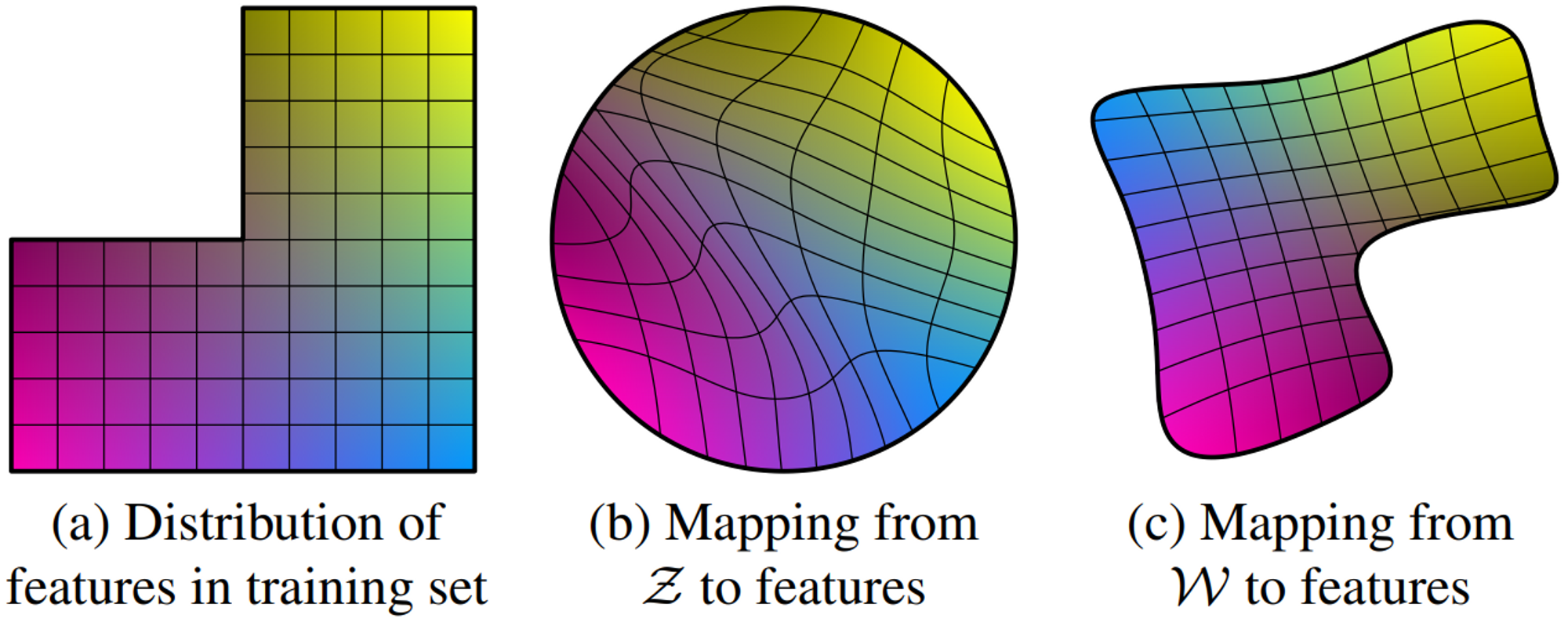
<p><img src="/assets/img/posts/stylegan-with-encoder/disentanglement.png" alt="Illustrative example taken from StyleGAN" /></p>

<p><span class="image-description"><strong>Illustrative example taken from StyleGAN [1]</strong>. Two factors of variation (image features, e.g., masculinity and hair length): (a) An example training set where some combination (e.g., long-haired males) is missing. (b) This forces the mapping from $\mathcal{Z}$ to image features to become curved so that the forbidden combination disappears in $\mathcal{Z}$ to prevent the sampling of invalid combinations. (c) The learned mapping from $\mathcal{Z}$ to $\mathcal{W}$ is able to “undo” much of the warping.</span></p>

<p>GAN can be viewed as a self-supervised representation learning approach with contrastive loss, where real images are positive examples and the generator produces negative ones.</p>

<p>As mentioned, one of the limitations is that a common GAN is non-invertible, meaning it can only generate images from random noise and cannot extract embeddings from real images. Although there are methods to project real images into GAN’s latent space, the most popular is slow and computationally expensive as it is based on an optimization approach. 
Instead, we can train an encoder along with the generator and discriminator. From this point of view, GAN can be viewed as a self-supervised representation learning approach with contrastive loss, where real images are positive examples and the generator produces negative ones.</p>

<p>Essentially, the discriminator in GAN already has an encoding part, as it is nothing more than a simple CNN binary classification model and CNNs are known to be good at extracting features from images. As a matter of fact, we can logically decompose it into a CNN encoder network and a fully connected discriminator network. So, Instead of adding another network, we can reuse the discriminator’s weights, saving memory and computational resources.</p>

<p><img src="/assets/img/posts/stylegan-with-encoder/ALAE.png" alt="**Architecture of Adversarial Latent Autoencoder [3].**" /></p>

<p><span class="image-description"><strong>Architecture of Adversarial Latent Autoencoder [3].</strong></span></p>

<p>The approach described in this article is based on the architecture proposed in “Adversarial Latent Autoencoders” (ALAE) [3]. To make the latent spaces of the Mapping network $F$ and encoder $E$ consistent with each other, the authors add an additional term to the GAN loss:</p>

\[L_{\text{consistency}} = E_{p(z)}\bigg [ ||F(z) - E \circ G \circ F(z) ||_2^2 \bigg ]\]

<p>This term forces the encoder to produce the same latent vector from a synthetic image used to generate it. More precisely, we first generate an intermediate vector from noise, $w = F(z)$, then generate a synthetic image from it, $x^\prime = G(w)$, and encode it back into an intermediate vector, $w^{\prime} = E(x^\prime)$. Finally, we minimize the $L_2$ norm between these vectors, $|| w - w^\prime||_2^2$.</p>

<p>In contrast to autoencoders, where the loss calculates an error element-wise in pixel space, this loss operates in latent space. The pixel-wise $L_2$ norm loss is one of the reasons why autoencoders have not been as successful as GANs in generating diverse and high-quality images [4]. Its application in pixel space does not reflect human visual perception, since an image shift of even one pixel may cause a large pixel-wise error, while its representation in latent space would be barely changed. Therefore, the $L_2$ norm can be used more effectively by applying it to the latent space providing invariance, such as for translation.</p>

<p>Additionally, ALAE introduces an information flow between the generator and discriminator, which makes the model more complex but can improve convergence speed and image quality. In this example, I leave it out to keep everything simple.</p>

<h2 id="implementation">Implementation</h2>

<p>To demonstrate this approach I chose an unofficial StyleGAN2 PyTorch <a href="https://github.com/rosinality/stylegan2-pytorch">implementation</a>.</p>

<p>The main change is the introduction of a new loss term which I called <a href="https://github.com/karray/stylegan2-pytorch/blob/master/solver_celeba.py#L295">consistency loss</a>:</p>

<div class="language-python highlighter-rouge"><div class="highlight"><pre class="highlight"><code><table class="rouge-table"><tbody><tr><td class="rouge-gutter gl"><pre class="lineno">1
2
3
4
5
</pre></td><td class="rouge-code"><pre><span class="n">z</span> <span class="o">=</span> <span class="n">torch</span><span class="p">.</span><span class="n">randn</span><span class="p">(</span><span class="n">args</span><span class="p">.</span><span class="n">batch</span><span class="p">,</span> <span class="n">args</span><span class="p">.</span><span class="n">latent</span><span class="p">,</span> <span class="n">device</span><span class="o">=</span><span class="n">device</span><span class="p">)</span>
<span class="n">w_z</span> <span class="o">=</span> <span class="n">mapping</span><span class="p">(</span><span class="n">z</span><span class="p">)</span>
<span class="n">fake_img</span><span class="p">,</span> <span class="n">_</span> <span class="o">=</span> <span class="n">generator</span><span class="p">([</span><span class="n">w_z</span><span class="p">])</span>
<span class="n">w_e</span> <span class="o">=</span> <span class="n">encoder</span><span class="p">(</span><span class="n">fake_img</span><span class="p">)</span>
<span class="n">consitency_loss</span> <span class="o">=</span> <span class="p">(</span><span class="n">w_z</span> <span class="o">-</span> <span class="n">w_e</span><span class="p">).</span><span class="nb">pow</span><span class="p">(</span><span class="mi">2</span><span class="p">).</span><span class="n">mean</span><span class="p">()</span>
</pre></td></tr></tbody></table></code></pre></div></div>

<p>Basically, that’s all. We could use the original implementation of the discriminator and slightly change it to return intermediate results, right after the last convolutional layer. But I find it much cleaner to split the <a href="https://github.com/karray/stylegan2-pytorch/blob/master/model.py#L869">discriminator</a> into two independent networks: <a href="https://github.com/karray/stylegan2-pytorch/blob/master/model.py#L945">Encoder</a> and <a href="https://github.com/karray/stylegan2-pytorch/blob/master/model.py#L930">DiscriminatorMini</a>.</p>

<p>Since the <a href="https://github.com/karray/stylegan2-pytorch/blob/master/model.py#L621">Generator</a> in this implementation is combined with the mapping network, I also split it into 2 separate networks: <a href="https://github.com/karray/stylegan2-pytorch/blob/master/model.py#L420">Generator1</a> and <a href="https://github.com/karray/stylegan2-pytorch/blob/master/model.py#L391">MappingNetwork</a>.</p>

<h2 id="evaluation">Evaluation</h2>

<p>To quantitatively evaluate the encoder, I trained a base ResNet18 model on raw images and linear logistic regression along with SVM with linear kernel on embeddings (this was done only for MNIST and PCam datasets).</p>

<p>The expected result is that the embeddings will be linearly separable and the accuracy of the base models will be similar to that of linear models. This assumption is based on the use of PPL, which enforces a disentangled and linearly separable latent space.</p>

<p>Visual inspection still remains the standard evaluation approach, so I generated synthetical images to check if the model was not broken and also visualized embedding using <a href="https://umap-learn.readthedocs.io/en/latest/plotting.html#interactive-plotting-and-hover-tools">UMAP</a> to see if they form clusters.</p>

<h2 id="results">Results</h2>

<p>I trained this model on three different datasets: <a href="https://paperswithcode.com/dataset/mnist">MNIST</a>,  <a href="https://paperswithcode.com/dataset/celeba-hq">CelebA</a> + <a href="https://paperswithcode.com/dataset/ffhq">FFHQ</a>, and <a href="https://github.com/basveeling/pcam">PCam</a>, and moved the <a href="https://github.com/karray/stylegan2-pytorch/blob/master/train.py">training logic</a> to the <a href="https://github.com/karray/stylegan2-pytorch/blob/master/solver_mnist.py">solver_mnist.py</a>, <a href="https://github.com/karray/stylegan2-pytorch/blob/master/solver_celeba.py">solver_celeba.py</a>, and <a href="https://github.com/karray/stylegan2-pytorch/blob/master/solver_pcam.py">solver_pcam.py</a>, respectively. Each of the solvers has been slightly adjusted to match the dataset requirements. There is also a <a href="https://www.kaggle.com/code/karray/stylegan-with-encoder">notebook</a> with pretrained models where you can reproduce the results.</p>

<h3 id="mnist">MNIST</h3>

<p>Since the images in the MNIST dataset are only 28x28 pixels (were converted to 32x32x3) and the dataset itself is very simple, I first trained the model on it to test whether there are no bugs and the algorithm works as expected.</p>

<div class="language-bash highlighter-rouge"><div class="highlight"><pre class="highlight"><code><table class="rouge-table"><tbody><tr><td class="rouge-gutter gl"><pre class="lineno">1
</pre></td><td class="rouge-code"><pre>python3 solver_mnist.py <span class="nt">--path</span> path/to/save/dataset <span class="nt">--size</span> 128 <span class="nt">--name</span> &lt;Project name&gt; <span class="nt">--run_name</span> &lt;experiment name&gt; <span class="nt">--batch</span> 32 <span class="nt">--iter</span> 10000 <span class="nt">--augment</span> <span class="nt">--wandb</span>
</pre></td></tr></tbody></table></code></pre></div></div>

<p>Where <code class="language-plaintext highlighter-rouge">--name</code> and <code class="language-plaintext highlighter-rouge">--run_name</code> are used for <a href="https://wandb.ai">wandb</a> logging. The description of the parameters for each solver can be found in the help strings.</p>

<p>First I generate some random images to see if the changes didn’t break the model:</p>

<p><img src="/assets/img/posts/stylegan-with-encoder/mnist_from_z.png" alt="Synthetic numbers" /></p>

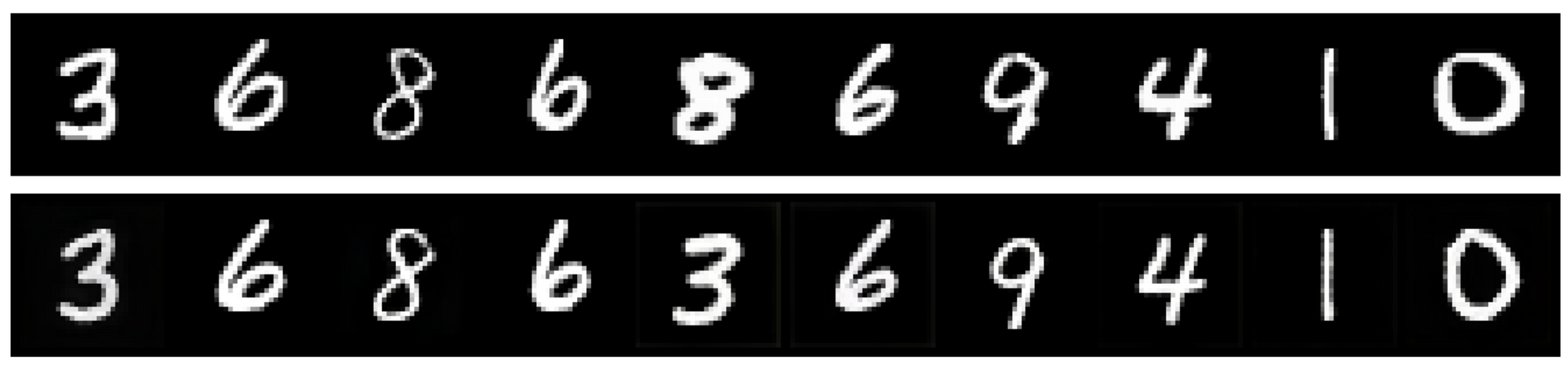
<p>Next, I check if the encoder produces latent features from the same distribution as the generator by encoding real images from the test set (that the model hasn’t seen) and generating new ones from these embeddings:</p>

<p><img src="/assets/img/posts/stylegan-with-encoder/mnist_reconstruction.png" alt="The first row represents the original images, the second row demonstrates the reconstruction" /></p>

<p><span class="image-description">The first row represents the original images, the second row demonstrates the reconstruction</span></p>

<p>This figure demonstrates that the reconstruction works fairly well but is not ideal (one of the <code class="language-plaintext highlighter-rouge">8</code> was reconstructed into <code class="language-plaintext highlighter-rouge">3</code>).</p>

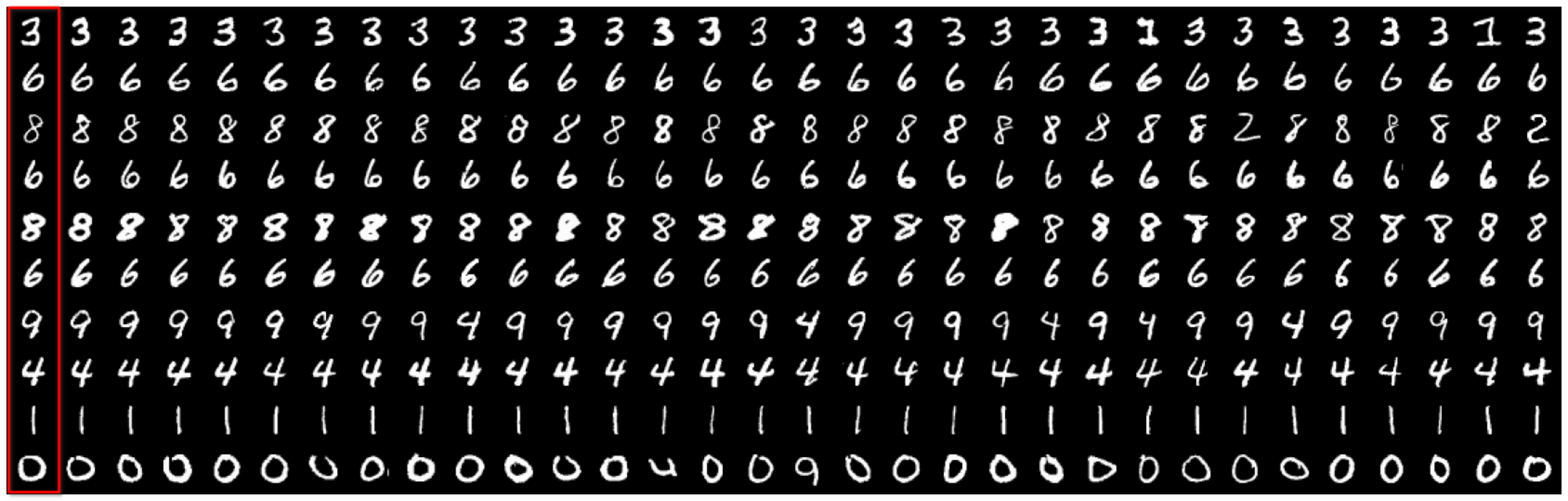
<p>Additionally, I encoded the whole test set and used the embeddings to demonstrate querying top N similar images using cosine similarity:</p>

<p><img src="/assets/img/posts/stylegan-with-encoder/mnist_querying.png" alt="Searching for the most similar images. The first column contains real images." /></p>

<p><span class="image-description">Searching for the most similar images. The first column contains real images</span></p>

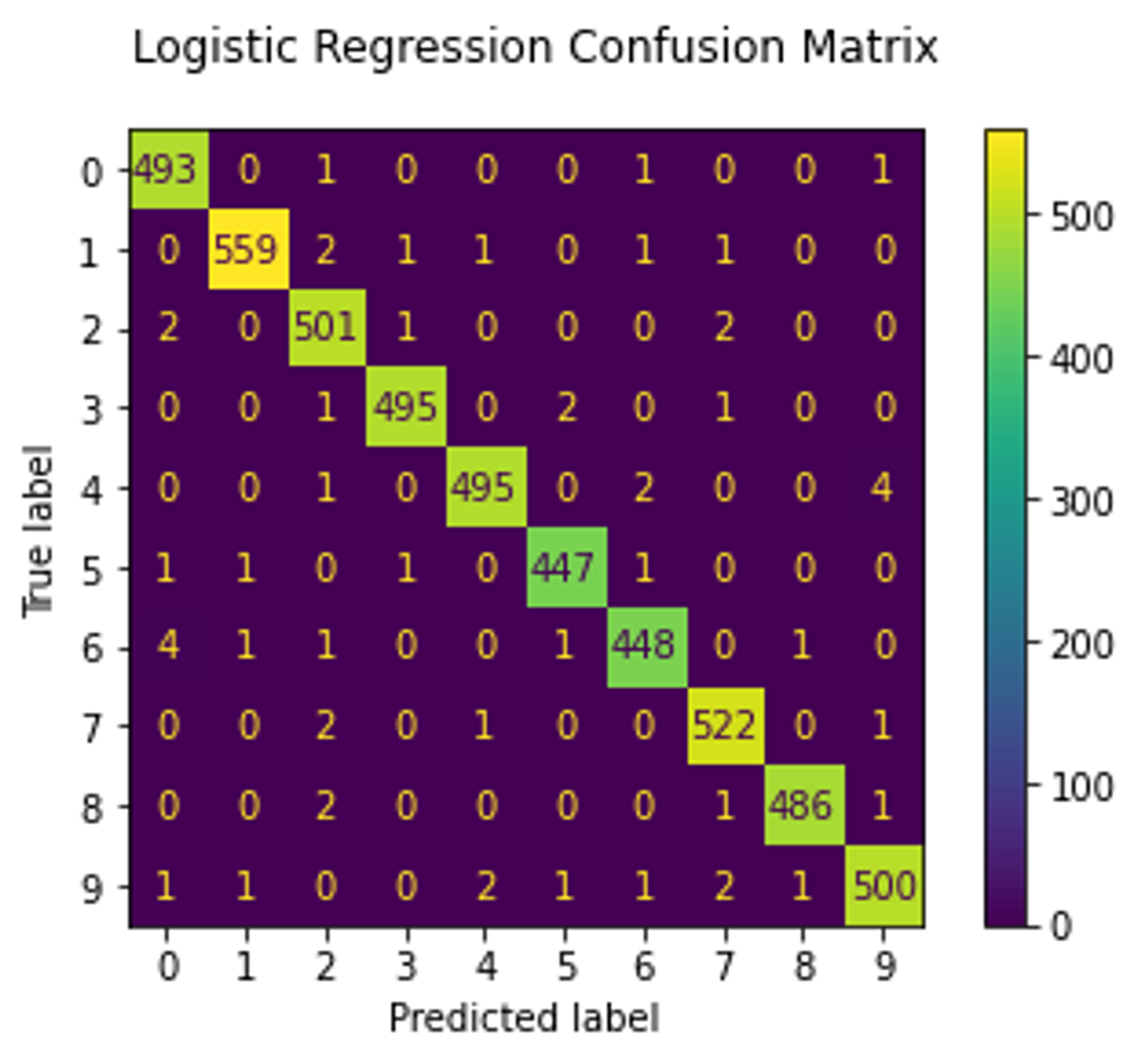
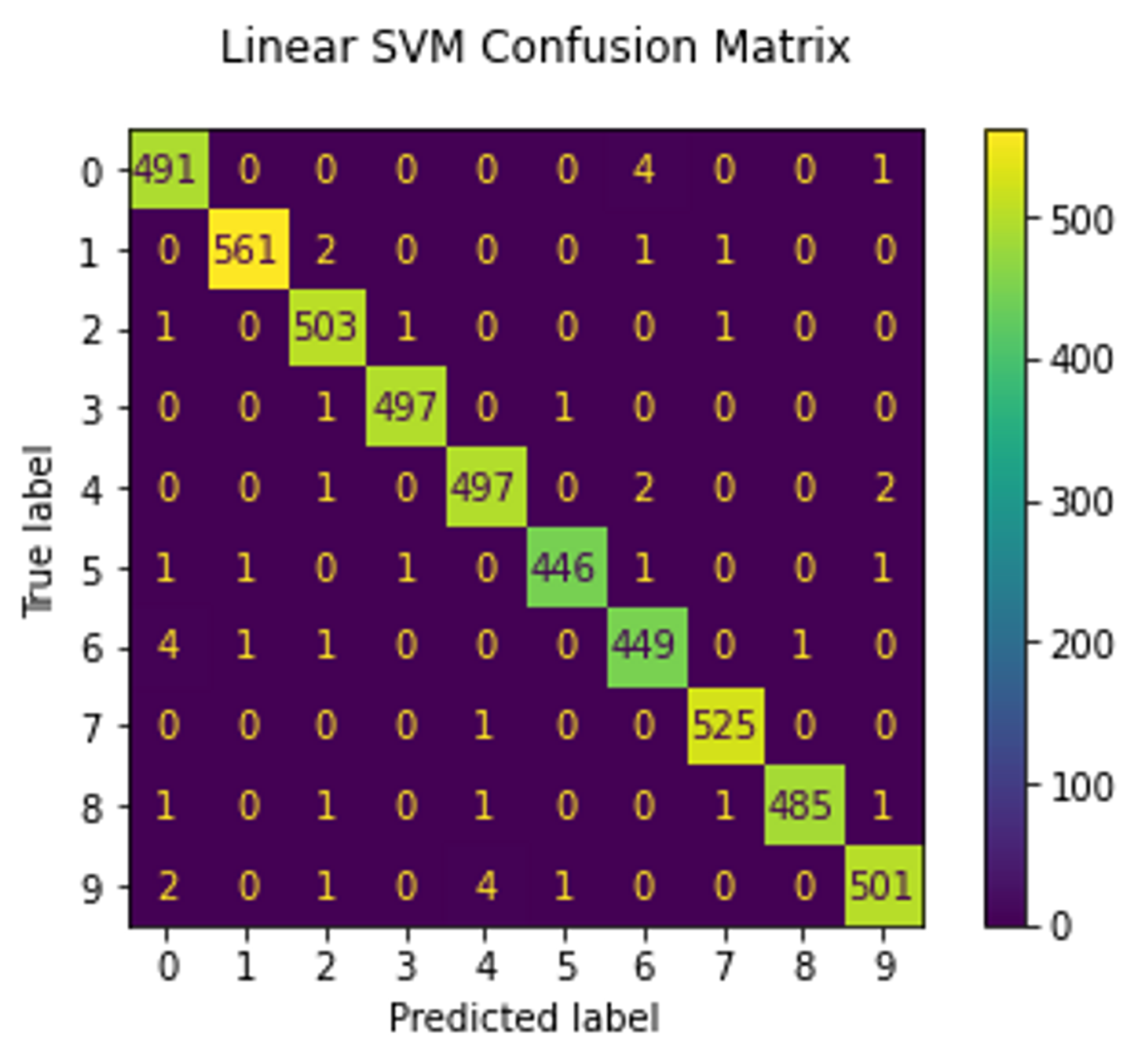
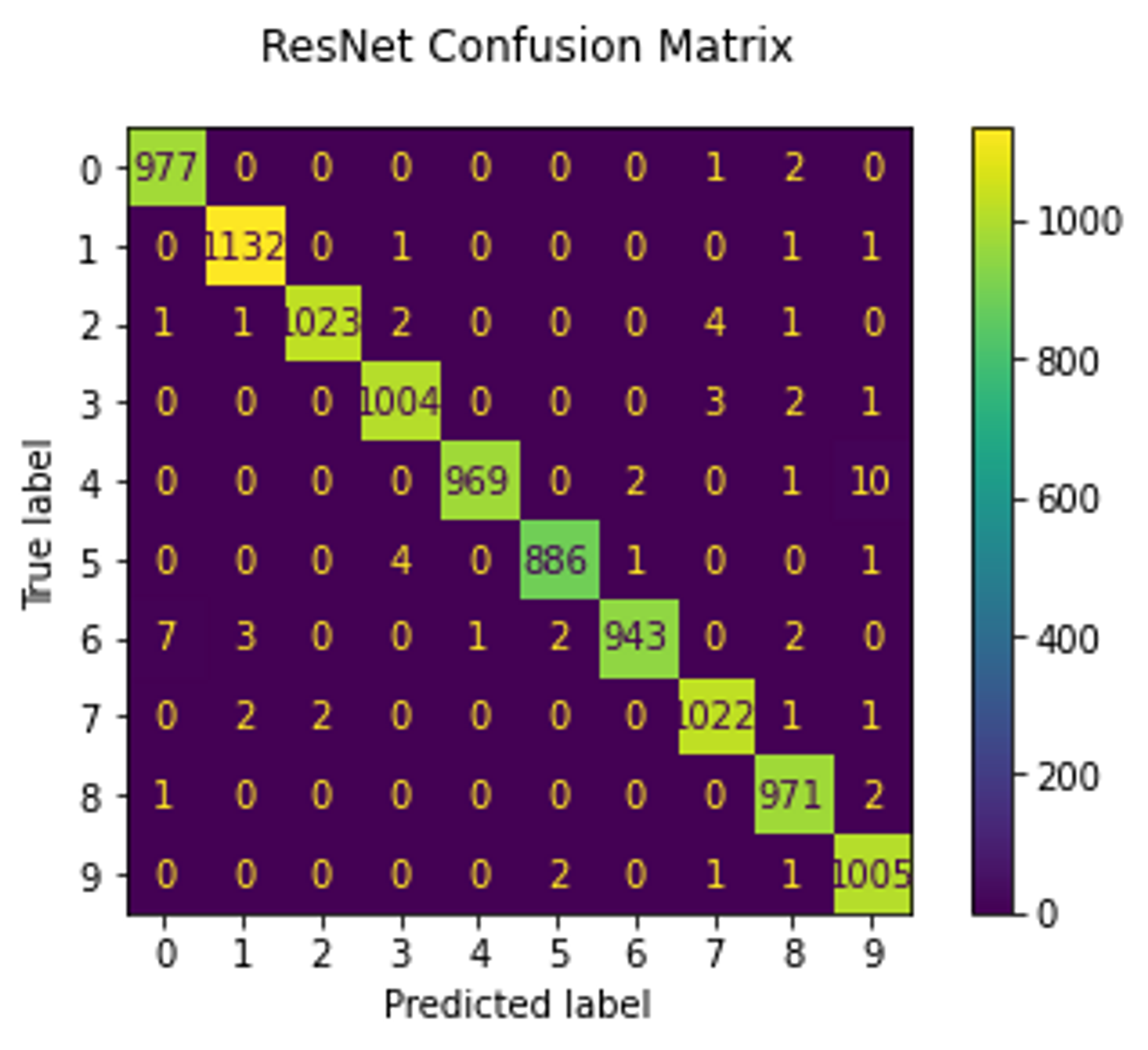
<p>Now, we move on to quantitative assessment. As mentioned earlier, I trained linear SVM and logistic regression models to check if the embeddings are linearly separable. These models were trained on embeddings produced from half of the test set (which the GAN did not see) and the other half was used as a validation set. Both models reached 99% accuracy. The <code class="language-plaintext highlighter-rouge">RestNet18</code> model was trained on the raw images from the training set and validated on the entire test set. It also achieved 99% accuracy which indicates that the GAN model has successfully learned the disentangled latent representation.</p>

<table>
  <tbody>
    <tr>
      <td><img src="/assets/img/posts/stylegan-with-encoder/mnist_regression_confusion_matrix.png" alt="Logistic regression confusion matrix" /></td>
      <td><img src="/assets/img/posts/stylegan-with-encoder/mnist_svm_confusion_matrix.png" alt="SVM confusion matrix" /></td>
      <td><img src="/assets/img/posts/stylegan-with-encoder/mnist_resnet_confusion_matrix.png" alt="ResNet confusion matrix" /></td>
    </tr>
  </tbody>
</table>

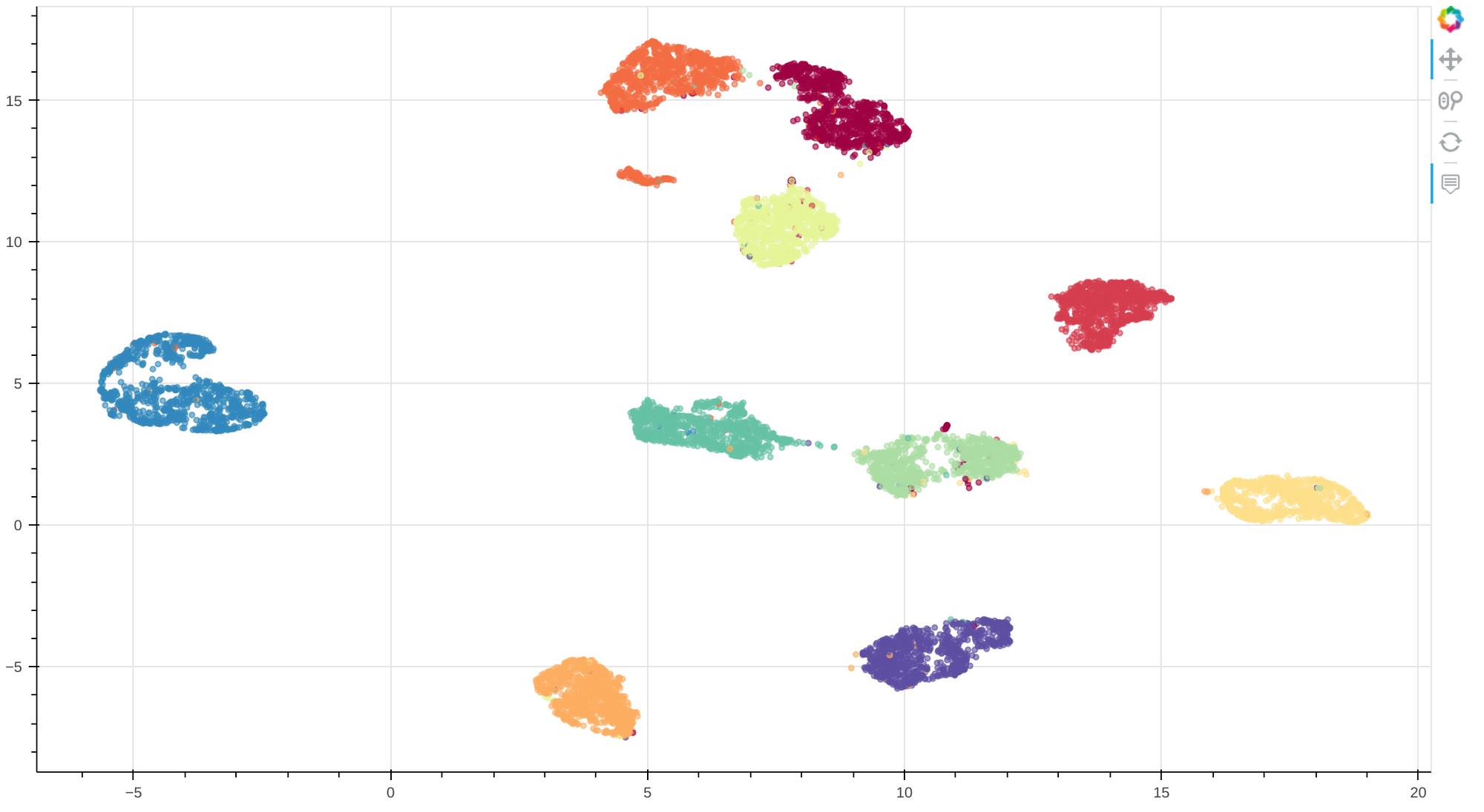
<p>Finally, I visualize the embeddings by projecting them into 2d space using UMAP:</p>

<p><img src="/assets/img/posts/stylegan-with-encoder/mnist_visualization.png" alt="MNIST embeddings visualization" /></p>

<p><span class="image-description"><strong>MNIST embeddings visualization.</strong> Each color represents a number from 0 to 9</span></p>

<p>This visualization demonstrates that there are clear clusters with few misassignments, supporting the statement that the model was able to learn a linearly separable (and thus disentangled) latent representation. A look at the interactive <a href="https://karay.me/examples/stylegan2-with-encoder/mnist.html">visualization</a> suggests that most of the misassigned samples look very similar to the nearest ones. I especially like how crossed <code class="language-plaintext highlighter-rouge">7</code> forms a separate cluster, although this would cause problems if we wanted to label clusters.</p>

<h3 id="celeba-and-ffhq">CelebA and FFHQ</h3>

<p>After testing the model on MNIST, it was trained on the CelebA + FFHQ datasets.</p>

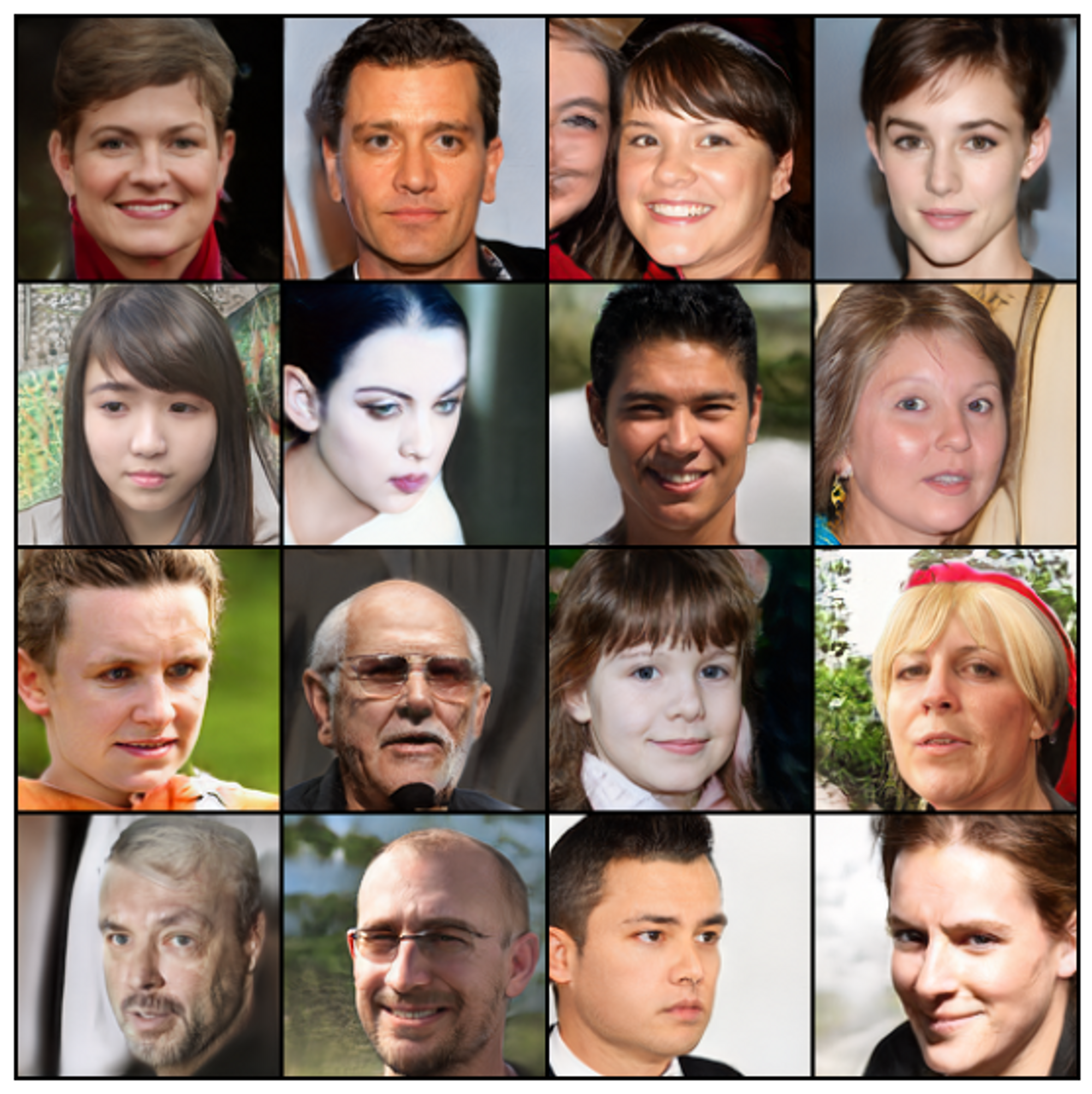
<p>As before, let’s generate some random images to see if the model works correctly:</p>

<p><img src="/assets/img/posts/stylegan-with-encoder/celeba_from_z.png" alt="Synthetic images generated from noise using custom ALAE" /></p>

<p><span class="image-description"><strong>Synthetic images generated from noise using custom ALAE</strong></span></p>

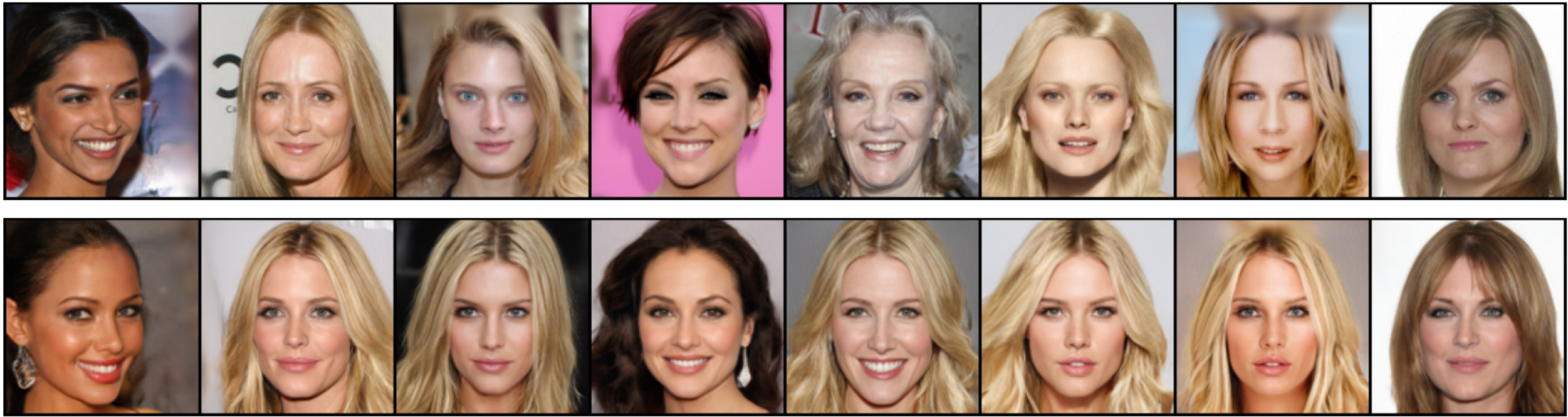
<p>Now, let’s reconstruct real images:</p>

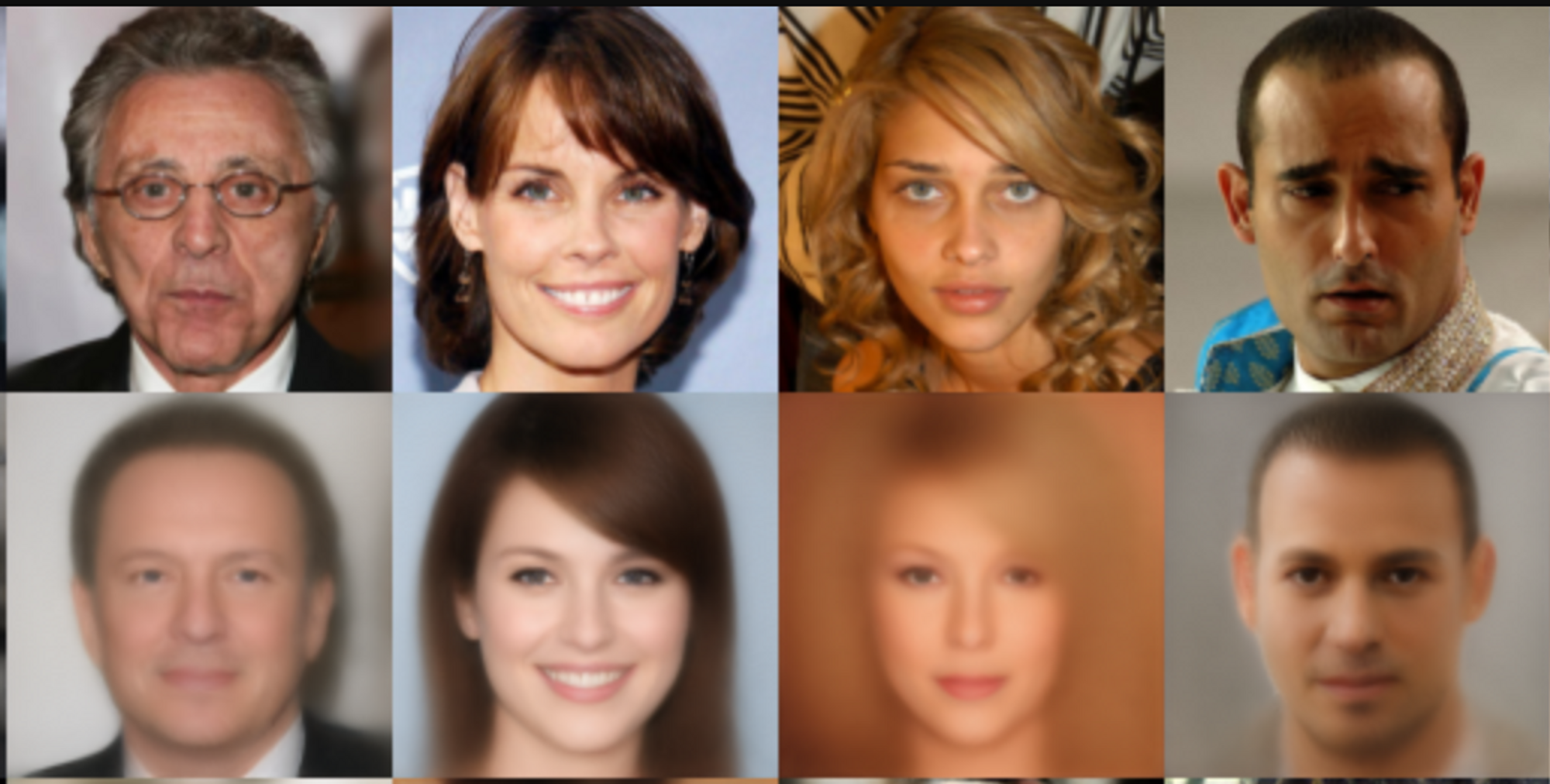
<p><img src="/assets/img/posts/stylegan-with-encoder/celeba_reconstruction.png" alt="The first row represents original images, the second row demonstrates reconstruction" /></p>

<p><span class="image-description">The first row represents original images, the second row demonstrates reconstruction</span></p>

<p>We can see that the images have been reconstructed inaccurately.</p>

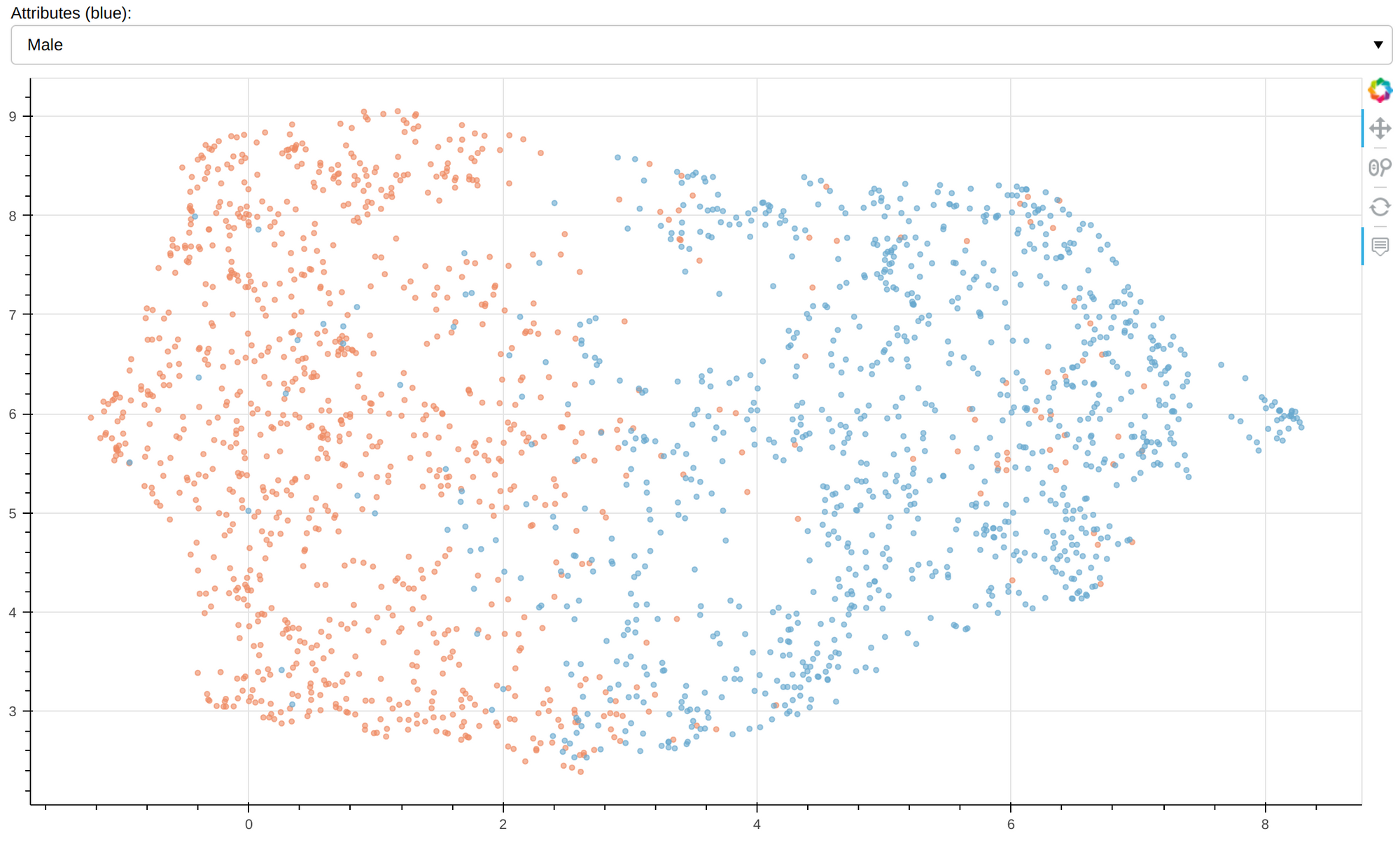
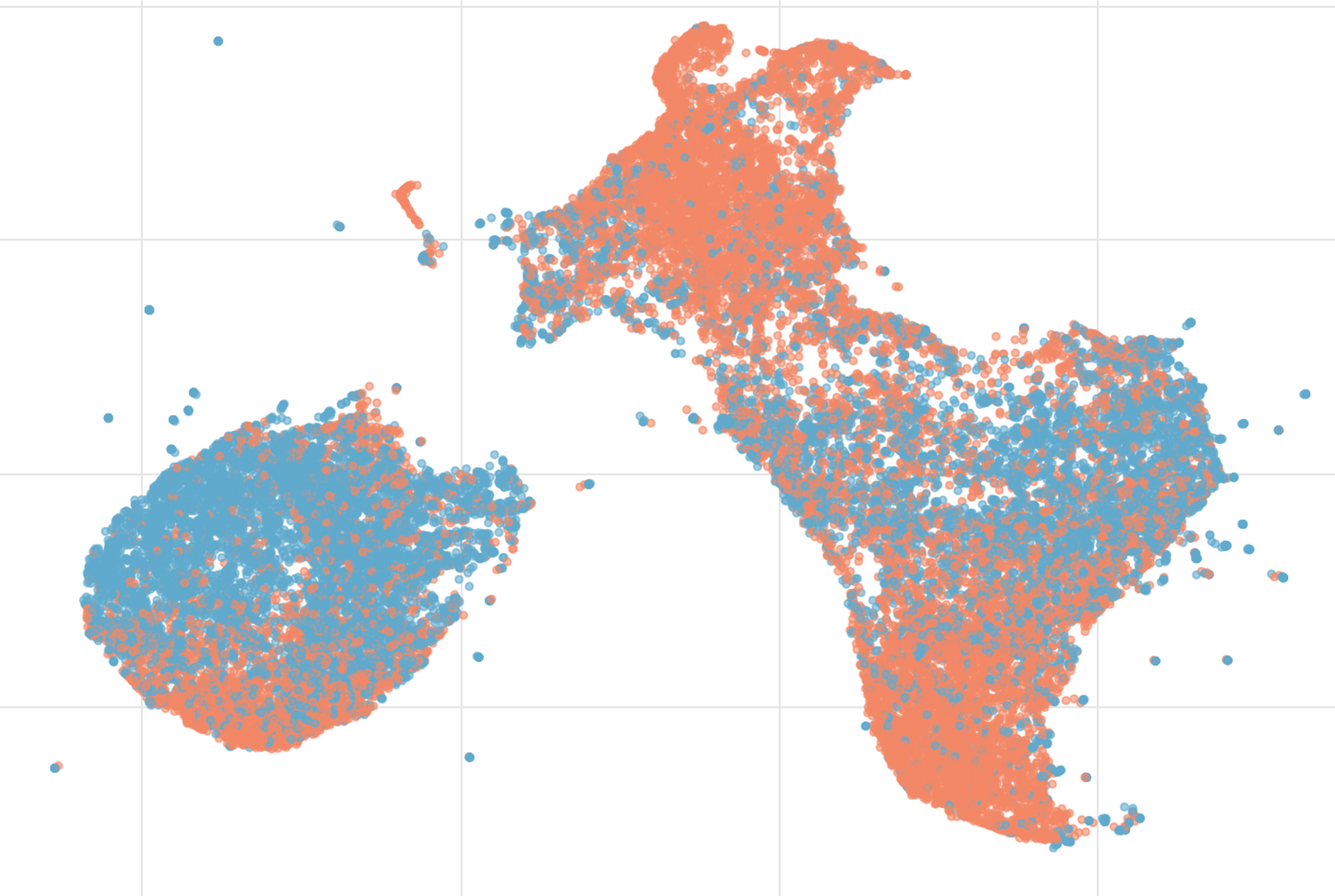
<p>And here is a visualization of embedding with the gender attribute highlighted:</p>

<p><img src="/assets/img/posts/stylegan-with-encoder/celeba_visualization.png" alt="CelebA test set visualization of embeddings" /></p>

<p><span class="image-description"><strong>CelebA test set visualization of embeddings.</strong> Orange - female, blue - male.</span></p>

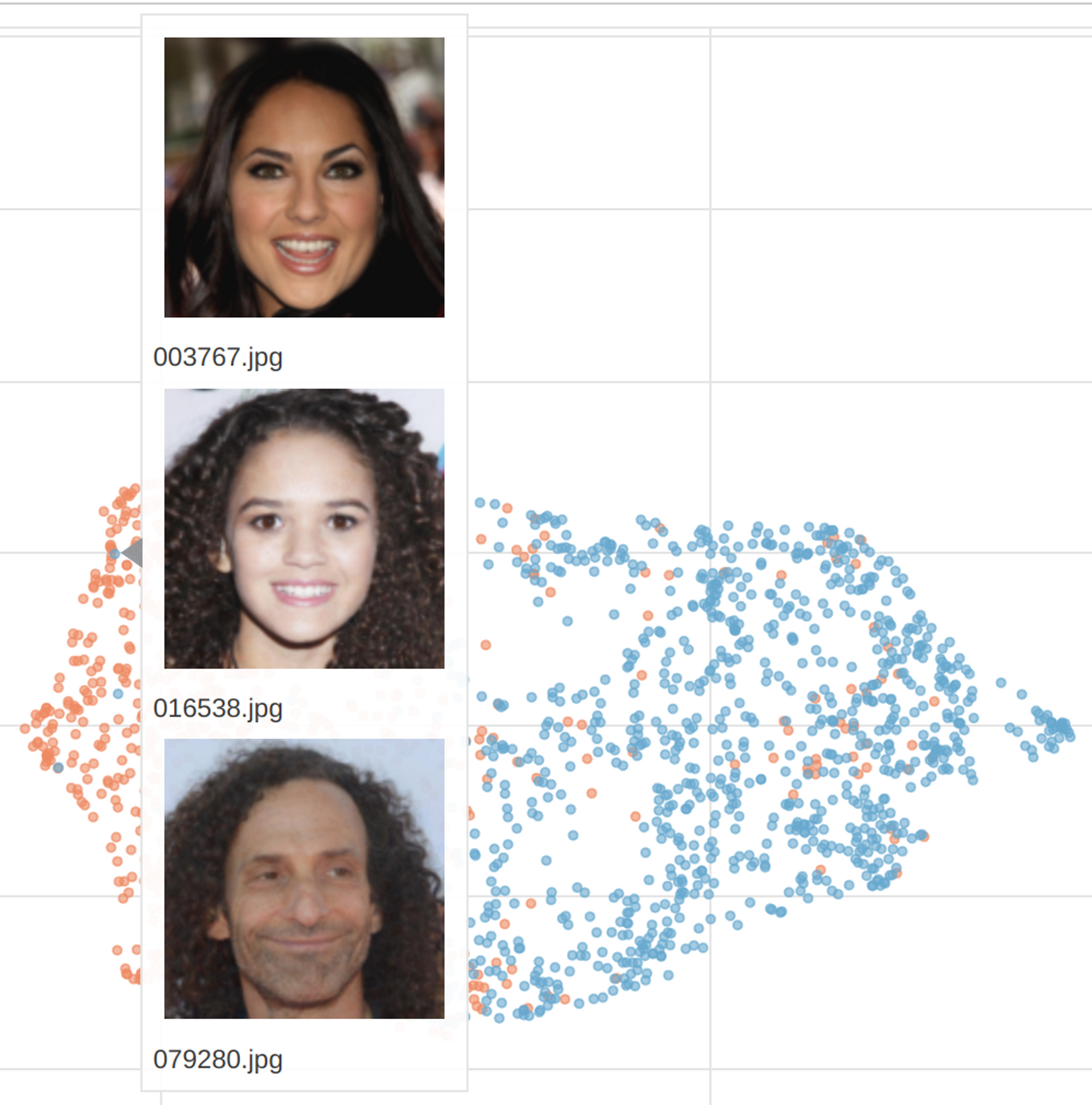
<p>At first glance, the model seems to have succeeded in capturing the gender attribute, but a closer look at the interactive <a href="https://karay.me/examples/stylegan2-with-encoder/celeba_ffhq.html">visualization</a> reveals that the haircut may play a greater role.</p>

<p><img src="/assets/img/posts/stylegan-with-encoder/celeba_visualization_male.png" alt="Misassignment gender attribute" /></p>

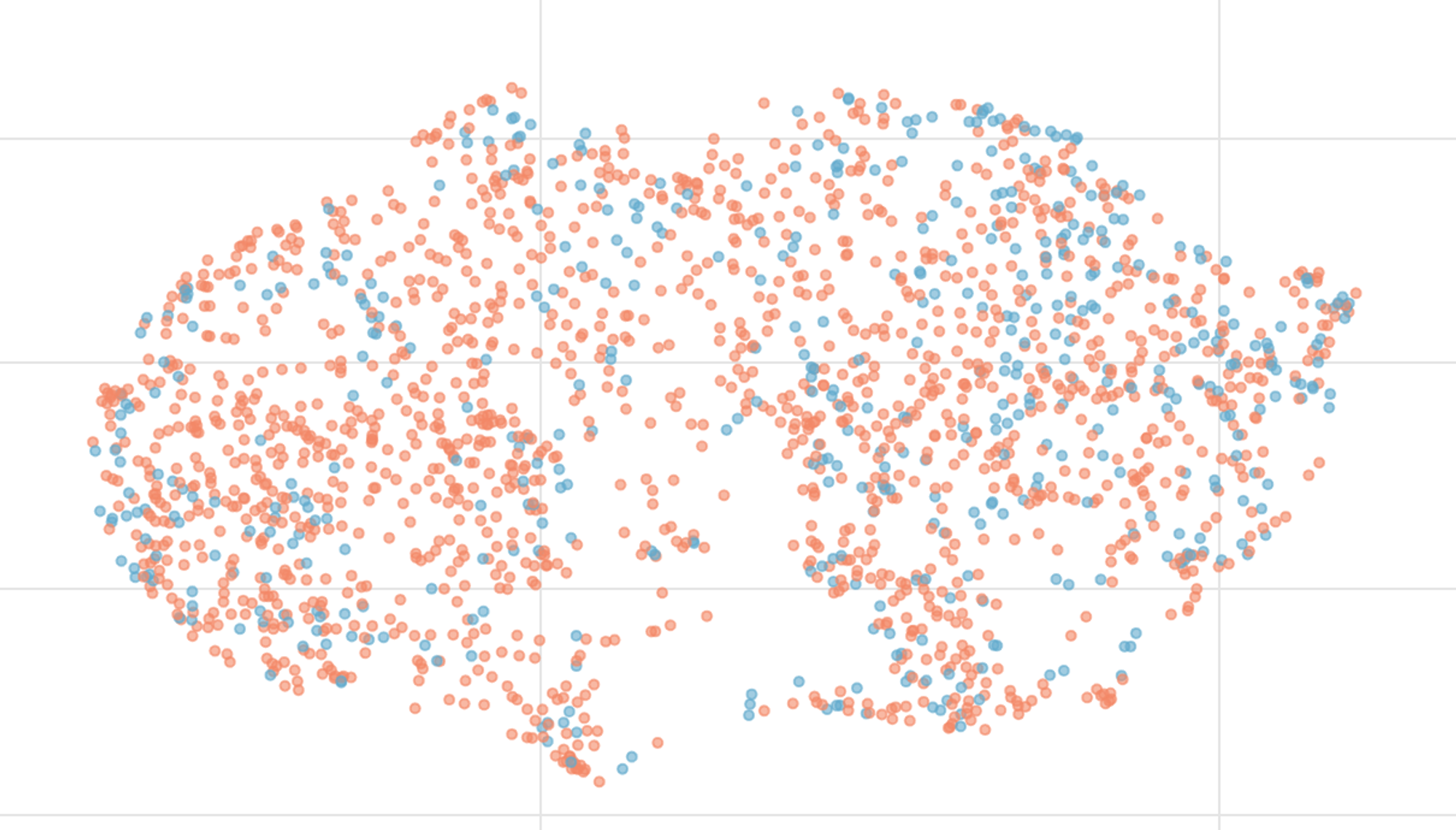
<p>However, which features were decisive remains open. For instance, this diagram shows the attribute <code class="language-plaintext highlighter-rouge">black hair</code>:</p>

<p><img src="/assets/img/posts/stylegan-with-encoder/celeba_visualization_hair.png" alt="Visualization of black hair attribute" /></p>

<p><span class="image-description"><code class="language-plaintext highlighter-rouge">black hair</code> in blue</span></p>

<p>As previously mentioned, the reconstruction loss may decrease the quality of images. To test this, I added a reconstruction loss between real and generated images in pixel space. The figure below shows the results.</p>

<p><img src="/assets/img/posts/stylegan-with-encoder/pixelwsie_reconstruction.png" alt="Pixelwsie reconstruction loss" /></p>

<p><span class="image-description">The first row shows real images; the second shows the reconstruction</span></p>

<p>The results confirm that optimizing a GAN in latent space is generally considered to be a better approach for image generation.</p>

<h2 id="camelyon">Camelyon</h2>

<p>Finally, the model was trained on the <a href="https://camelyon16.grand-challenge.org/">Camelyon</a> data set that consists of medical images of H&amp;E-stained whole-slide images of lymph node sections containing normal tissues or with breast cancer metastases.</p>

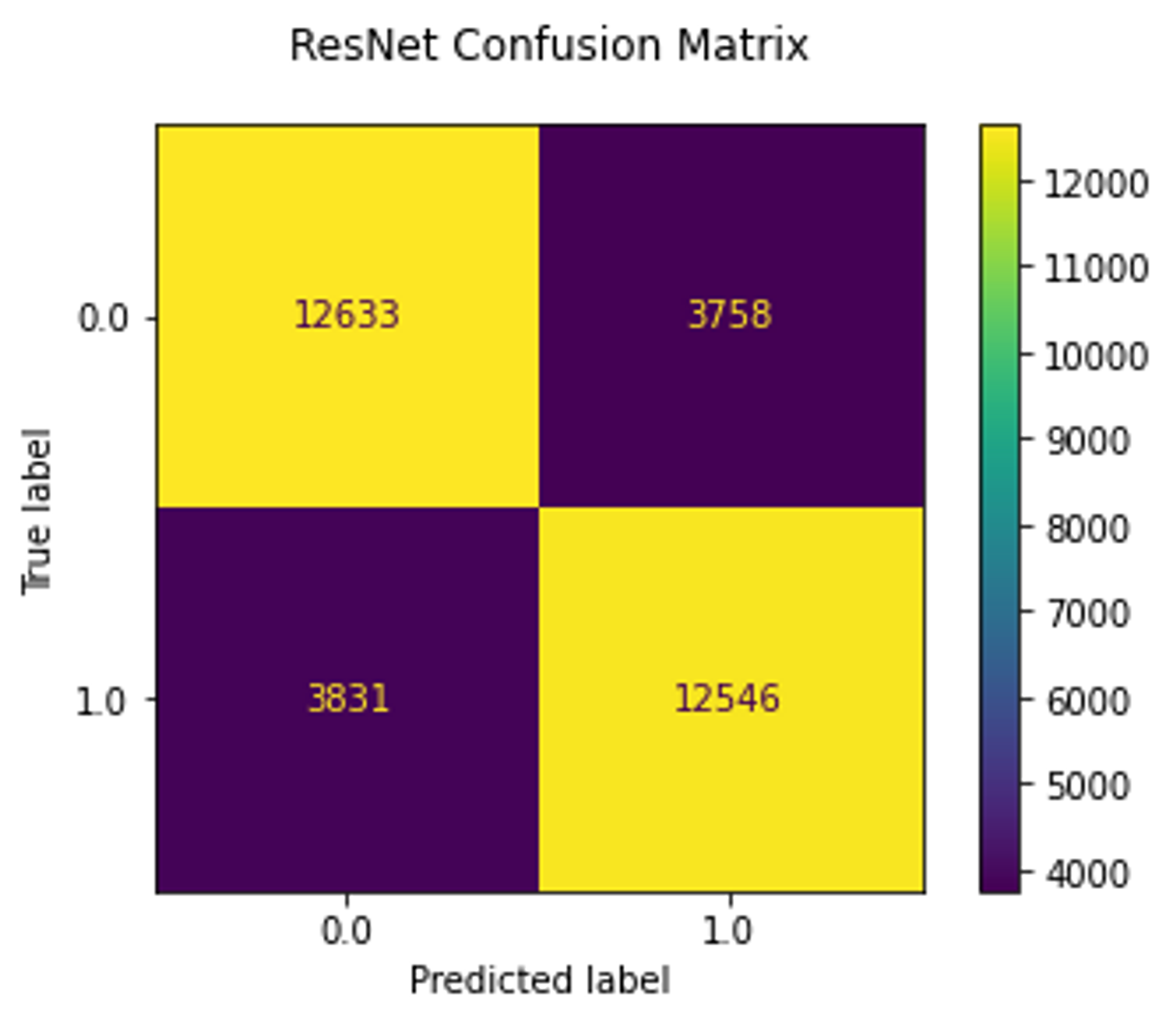
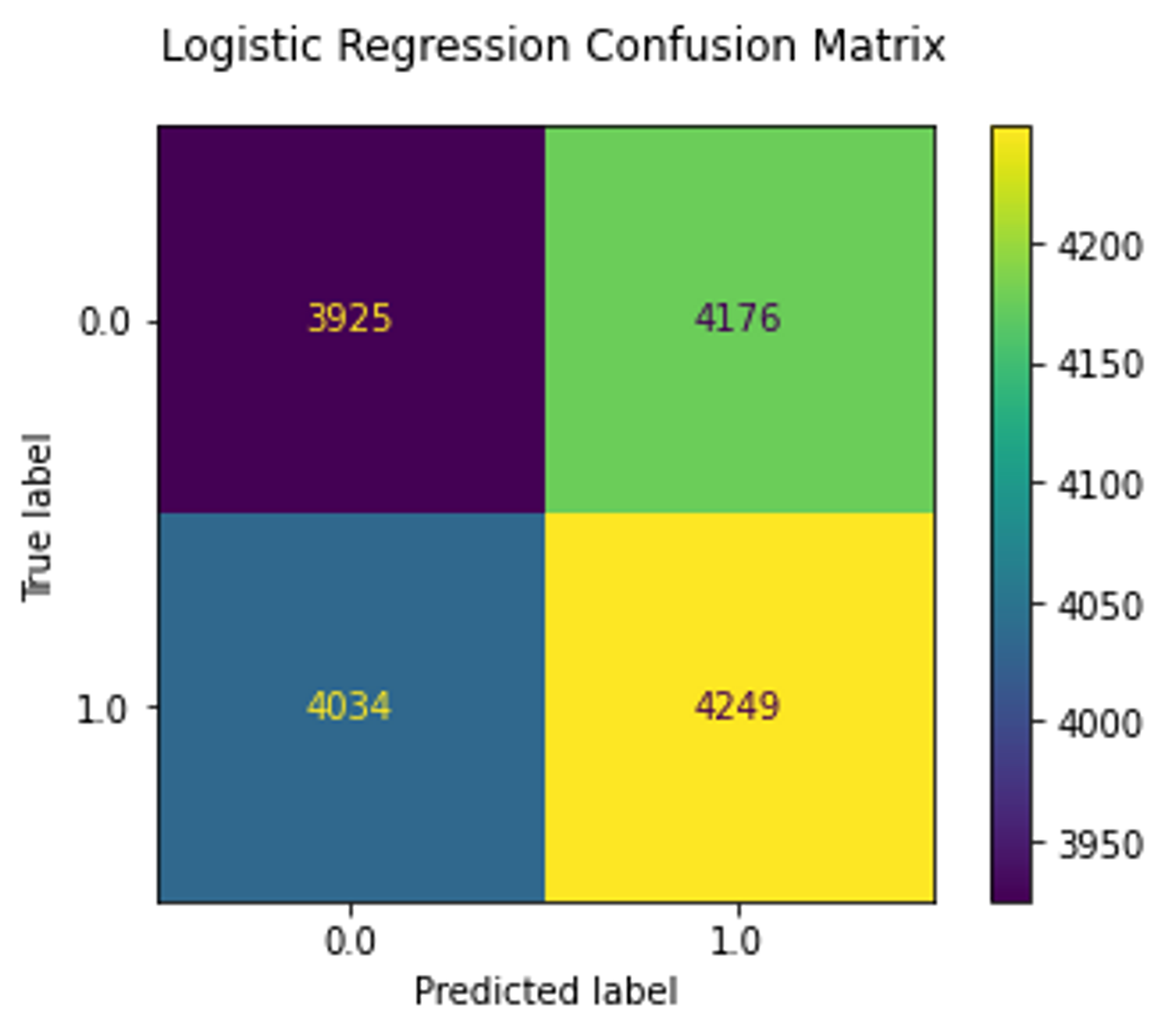
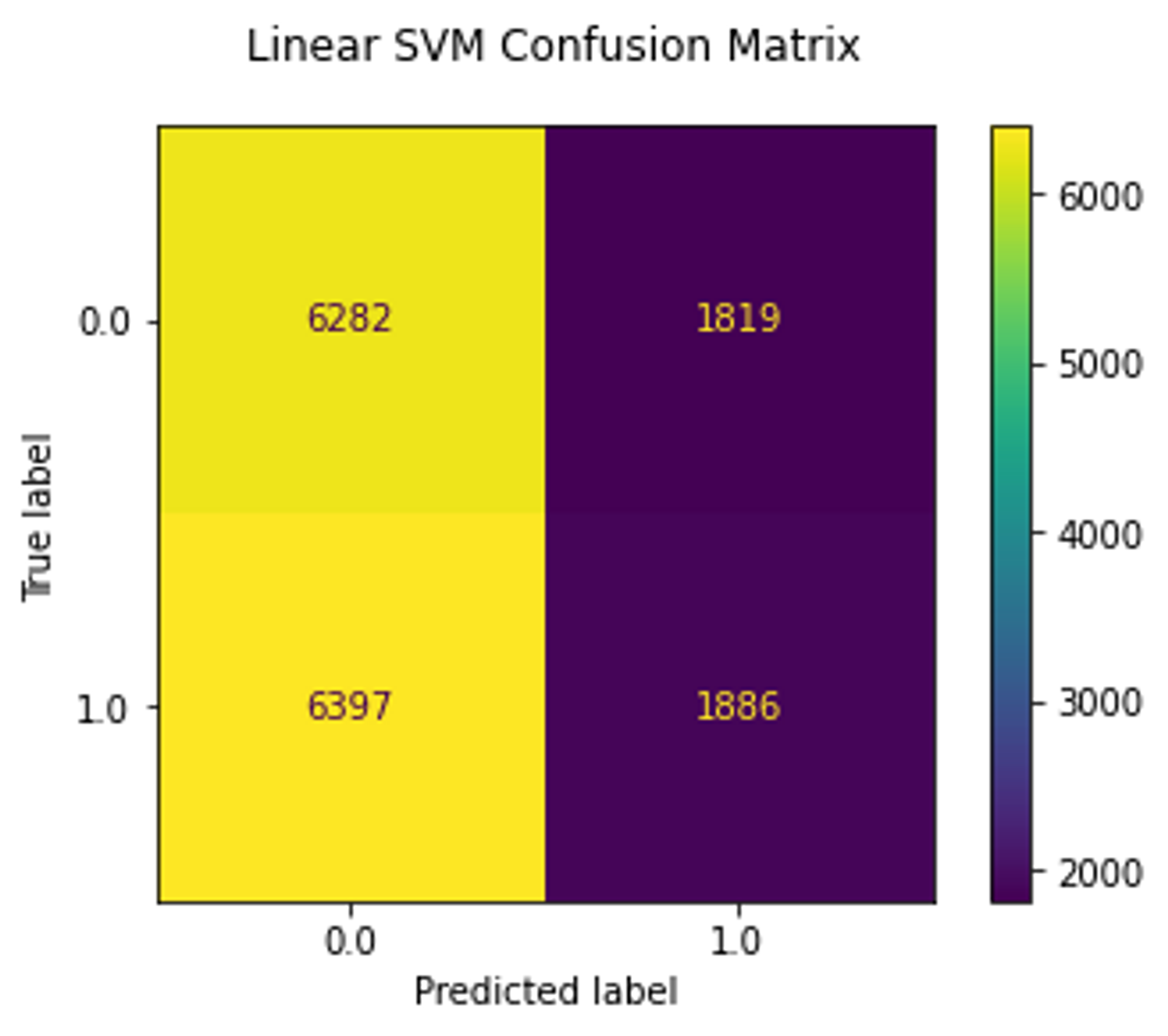
<p>Similar to MNIST experiment, I trained linear SVM and logistic regression on the test set.</p>

<table>
  <tbody>
    <tr>
      <td><img src="/assets/img/posts/stylegan-with-encoder/pcam_resnet_confusion_matrix.png" alt="ResNet confusion matrix" /></td>
      <td><img src="/assets/img/posts/stylegan-with-encoder/pcam_regression_confusion_matrix.png" alt="Logistic regression confusion matrix" /></td>
      <td><img src="/assets/img/posts/stylegan-with-encoder/pcam_svm_confusion_matrix.png" alt="SVM confusion matrix" /></td>
    </tr>
  </tbody>
</table>

<p>As we can see, the ResNet18 model reached 77% accuracy, whereas linear models trained on embeddings reached only 50% which is a random choice.</p>

<p>And here is a <a href="https://karay.me/examples/stylegan2-with-encoder/pcam.html">visualization</a> of the embeddings:</p>

<p><img src="/assets/img/posts/stylegan-with-encoder/pcam_visualization.png" alt="PCam visualization" /></p>

<p>This diagram shows embeddings colored by their class (normal, cancer). As you can see, these classes do not form clusters. This indicates that the model did not capture the cancer cells, making the approach useless for this dataset.</p>

<p>Note that there are several point clusters indicating that the dataset contains duplicates, completely black patches, and patches without tissues.</p>

<h3 id="conclusion">Conclusion</h3>

<p>As we have just seen that decomposing and reusing the encoder part of the discriminator and adding a simple consistency loss allow real images to be projected into latent space. Having disentangled embeddings can potentially allow us to identify features in the latent space and assign semantical attributes to them, which may allow us to reason predictions in downstream tasks, assuming that the latent representation is indeed disentangled.</p>

<p>However, the linear separability of the embeddings does not necessarily mean that the latent representation is disentangled, nor does the visualization with UMAP. This question, therefore, remains open for further investigation. Nonetheless, we still can use embeddings to search for similar samples and, for example, clean and balance datasets.</p>

<p>Another issue is that the encoder approach is not optimal, causing the model to fail to accurately reconstruct images. There are already better methods for inverting real images, for instance, by combining the encoder approach and optimization technique, but it is also not optimal as we still need to run an iterative optimization until we get reasonable embeddings. I encourage you to watch this <a href="https://www.youtube.com/watch?v=zyBQ9obuqfQ">talk</a> on the topic.</p>

<p>In conclusion, StyleGAN2 with encoder appears to be able to capture coarse details such as hair color or scanner color palette in digital pathology but may struggle with fine features that are only a few pixels in size. Further investigation is needed to confirm these findings.</p>

<h2 id="references">References</h2>

<p>[1] Karras, T., Laine, S., &amp; Aila, T. (2018). A Style-Based Generator Architecture for Generative Adversarial Networks. <a href="https://arxiv.org/abs/1812.04948">arXiv</a></p>

<p>[2] Karras, T., Laine, S., Aittala, M., Hellsten, J., Lehtinen, J., &amp; Aila, T. (2019). Analyzing and Improving the Image Quality of StyleGAN. <a href="https://arxiv.org/abs/1912.04958">arXiv</a></p>

<p>[3] Pidhorskyi, S., Adjeroh, D., &amp; Doretto, G. (2020). Adversarial Latent Autoencoders. <a href="https://arxiv.org/abs/2004.04467">arXiv</a></p>

<p>[4] Wu, Zongze, Dani Lischinski, and Eli Shechtman. “Stylespace analysis: Disentangled controls for StyleGAN image generation.” Proceedings of the IEEE/CVF Conference on Computer Vision and Pattern Recognition. 2021. <a href="https://openaccess.thecvf.com/content/CVPR2021/papers/Wu_StyleSpace_Analysis_Disentangled_Controls_for_StyleGAN_Image_Generation_CVPR_2021_paper.pdf">PDF</a></p>]]></content><author><name></name></author><category term="StyleGAN" /><category term="GAN" /><category term="deep-learning" /><category term="representation-learning" /><category term="self-supervised-learning" /><summary type="html"><![CDATA[This blog post explores the potential for using StyleGAN as a tool for extracting latent features from images. It investigates the challenges of using it for self-supervised representation learning and assesses its effectiveness at extracting meaningful features.]]></summary><media:thumbnail xmlns:media="http://search.yahoo.com/mrss/" url="https://karay.me/assets/img/posts/stylegan-with-encoder/mnist_visualization.png" /><media:content medium="image" url="https://karay.me/assets/img/posts/stylegan-with-encoder/mnist_visualization.png" xmlns:media="http://search.yahoo.com/mrss/" /></entry><entry><title type="html">Bringing Python to the Web</title><link href="https://karay.me/2022/07/12/bringing-python-to-the-web.html" rel="alternate" type="text/html" title="Bringing Python to the Web" /><published>2022-07-12T10:01:27+00:00</published><updated>2022-07-12T10:01:27+00:00</updated><id>https://karay.me/2022/07/12/bringing-python-to-the-web</id><content type="html" xml:base="https://karay.me/2022/07/12/bringing-python-to-the-web.html"><![CDATA[<p>Have you ever wanted to share your cool Python app with the world without deploying an entire Django server or developing a mobile app just for a small project?</p>

<p>Good news, you don’t have to! All you need is to add one JavaScript library to your HTML page and it will even work on mobile devices, allowing you to mix JS with Python so you can take advantage of both worlds.</p>

<!--more-->

<p>Take a look at this REPL example:</p>

<div class="full-width">
    <div class="wrapper">
        <div class="full-width-content">
            
<div id="load-simple-example" style="text-align: center;">
    <button onclick="loadExample()">Load Example</button>
    <div>
        <strong>Note that this may take some time and cause the page to freeze</strong>.
    </div>
</div>
<div id="simple-example" style="display: none;">

    Output:
    <textarea id="output" style="width: 100%;" rows="10" disabled=""></textarea>
    <textarea id="code" rows="3">
import numpy as np
np.ones((10,))
        </textarea>
    <button id="run" onclick="evaluatePython()">Run</button>
    <div>You can execute any Python code. Just enter something in the box above and click the button. </div>

    <script type="text/javascript">
        const output = document.getElementById("output")
        const code = document.getElementById("code")

        function loadExample() {
            document.getElementById('load-simple-example').remove()
            let div = document.getElementById('simple-example')
            div.style.display = 'block'

            output.value = 'Initializing...\n'

            if (!document.getElementById('pyodide-script')) {
                let pyodide_script = document.createElement('script')
                pyodide_script.id = 'pyodide-script'
                pyodide_script.type = 'text/javascript'
                pyodide_script.addEventListener('load', async () => {
                    // init pyodide
                    window.pyodide = await loadPyodide({stdout: addToOutput, stderr: addToOutput}) // redirect stdout and stderr to addToOutput
                    output.value += 'Ready!\n' 
                })
                pyodide_script.src = 'https://cdn.jsdelivr.net/pyodide/v0.21.3/full/pyodide.js'
                div.appendChild(pyodide_script)
            }
            else {
                output.value += 'Ready!\n'
            }

        }

        function addToOutput(s) {
            output.value += `${s}\n`
            output.scrollTop = output.scrollHeight
        }

        async function evaluatePython() {
            addToOutput(`>>>${code.value}`)

            // Since pyodide 0.18.0, you must call loadPackagesFromImports() to import any python packages referenced via import statements in your code. This function will no longer do it for you.
            await pyodide.loadPackagesFromImports(code.value, addToOutput, addToOutput)
            try {
                let result = await pyodide.runPythonAsync(code.value)
                addToOutput(`${result}`)
            }
            catch (e) {
                addToOutput(`${e}`)
            }
            code.value = ''
        }
    </script>
</div>

        </div>
    </div>
</div>

<div class="alert alert-info">
    <b>Note:</b>
    <p>This guide has been updated to Pyodide v0.21.3.</p>

</div>

<p>Witchcraft! This is made possible by <a href="https://webassembly.org/">WebAssembly</a> (Wasm) and the <a href="https://github.com/iodide-project/pyodide">Pyodide project</a>. You can also open the <a href="/examples/pyodide_repl.html" target="_blank">pyodide_repl.html</a> (<a href="https://github.com/karray/karray.github.io/blob/master/examples/pyodide_repl.html">source code</a>) example in a new tab.</p>

<p>So what can we actually do? Spoiler: With the power of Python and JS, we can do almost anything. But before getting into the details, let me first tell you a little story behind this writing.</p>

<p>I recently started a hobby <a href="http://karay.me/truepyxel/">project</a> where I implemented image pixelation. I decided to write it in Python, as this language has a bunch of libraries for working with images. The problem was that I couldn’t easily share the app without developing an Android app or finding a hosting and deploying a Django or Flask server.</p>

<p>I’ve heard about WebAssembly before and have wanted to try it out for a long time. Searching the Internet for “webassembly python”, I immediately came across a link to an interesting article “<a href="https://hacks.mozilla.org/2019/04/pyodide-bringing-the-scientific-python-stack-to-the-browser/">Pyodide: Bringing the scientific Python stack to the browser</a>”. Unfortunately, the article is mainly about the <a href="https://github.com/iodide-project/iodide">iodide project</a> that is no longer in development and the documentation of <a href="https://github.com/iodide-project/pyodide">Pyodide</a> was sparse.</p>

<p>The idea to write this article came to me when I decided to contribute to the project by improving its <a href="https://github.com/pyodide/pyodide/pull/767">documentation</a> after collecting the information about the API piece by piece and a number of experiments with code.</p>

<p>Here I would like to share my experience. I will also give more examples and discuss some issues.</p>

<h1 id="what-is-pyodide"><strong>What is Pyodide?</strong></h1>

<p>According to the official <a href="https://github.com/pyodide/pyodide">repository</a>,</p>

<blockquote>
  <p>Pyodide is a port of CPython to WebAssembly/Emscripten.
It was created in 2018 by <a href="https://github.com/mdboom">Michael Droettboom</a> at Mozilla as part of the Iodide project. Iodide is an experimental web-based notebook environment for literate scientific computing and communication.</p>
</blockquote>

<p>All of this is made possible by Wasm.</p>

<blockquote>
  <p>WebAssembly is a new type of code that can be run in modern web browsers and provides new features and major gains in performance. It is not primarily intended to be written by hand, rather it is designed to be an effective compilation target for source languages like C, C++, Rust, etc.</p>
</blockquote>

<p>Wasm could potentially have a huge impact on the future of front-end development by extending the JS stack with numerous libraries and opening new possibilities for developers programming in languages other than JS. For example, there are already projects using it under the hood, such as <a href="https://pyscript.net/">PyScript</a> by Anaconda.</p>

<p>So, it’s time to get your hands dirty. Let’s take a closer look at the minimal example</p>

<div class="language-html highlighter-rouge"><div class="highlight"><pre class="highlight"><code><table class="rouge-table"><tbody><tr><td class="rouge-gutter gl"><pre class="lineno">1
2
3
4
5
6
7
8
9
10
11
12
13
14
15
16
17
</pre></td><td class="rouge-code"><pre><span class="cp">&lt;!DOCTYPE html&gt;</span>
<span class="nt">&lt;html&gt;</span>
<span class="nt">&lt;head&gt;</span>
<span class="nt">&lt;script </span><span class="na">src=</span><span class="s">"https://cdn.jsdelivr.net/pyodide/v0.21.3/full/pyodide.js"</span><span class="nt">&gt;&lt;/script&gt;</span>
<span class="nt">&lt;script&gt;</span>
  <span class="p">(</span><span class="k">async</span> <span class="p">()</span> <span class="o">=&gt;</span> <span class="p">{</span> <span class="c1">// create anonymous async function to enable await</span>
    <span class="kd">const</span> <span class="nx">pyodide</span> <span class="o">=</span> <span class="k">await</span> <span class="nx">loadPyodide</span><span class="p">();</span>
    <span class="nx">console</span><span class="p">.</span><span class="nx">log</span><span class="p">(</span><span class="nx">pyodide</span><span class="p">.</span><span class="nx">runPython</span><span class="p">(</span><span class="s2">`
import sys
sys.version
    `</span><span class="p">));</span>
  <span class="p">})();</span> <span class="c1">// call the async function immediately</span>
<span class="nt">&lt;/script&gt;</span>
<span class="nt">&lt;/head&gt;</span>
<span class="nt">&lt;body&gt;</span>
<span class="nt">&lt;/body&gt;</span>
<span class="nt">&lt;/html&gt;</span>
</pre></td></tr></tbody></table></code></pre></div></div>

<p>First of all, we have to include the <code class="language-plaintext highlighter-rouge">pyodide.js</code> script by adding the CDN URL</p>

<div class="language-html highlighter-rouge"><div class="highlight"><pre class="highlight"><code><table class="rouge-table"><tbody><tr><td class="rouge-gutter gl"><pre class="lineno">1
</pre></td><td class="rouge-code"><pre><span class="nt">&lt;script </span><span class="na">src=</span><span class="s">"https://cdn.jsdelivr.net/pyodide/v0.21.3/full/pyodide.js"</span><span class="nt">&gt;&lt;/script&gt;</span>
</pre></td></tr></tbody></table></code></pre></div></div>

<p>After this, we must load the main Pyodide wasm module using <a href="https://pyodide.org/en/stable/usage/api/js-api.html#globalThis.loadPyodide">loadPyodide</a> and wait until the Python environment is bootstrapped</p>

<div class="language-js highlighter-rouge"><div class="highlight"><pre class="highlight"><code><table class="rouge-table"><tbody><tr><td class="rouge-gutter gl"><pre class="lineno">1
</pre></td><td class="rouge-code"><pre><span class="kd">const</span> <span class="nx">pyodide</span> <span class="o">=</span> <span class="k">await</span> <span class="nx">loadPyodide</span><span class="p">()</span>
</pre></td></tr></tbody></table></code></pre></div></div>

<p>Finally, we can run Python code</p>

<div class="language-js highlighter-rouge"><div class="highlight"><pre class="highlight"><code><table class="rouge-table"><tbody><tr><td class="rouge-gutter gl"><pre class="lineno">1
</pre></td><td class="rouge-code"><pre><span class="nx">console</span><span class="p">.</span><span class="nx">log</span><span class="p">(</span><span class="nx">pyodide</span><span class="p">.</span><span class="nx">runPython</span><span class="p">(</span><span class="dl">'</span><span class="s1">import sys; sys.version</span><span class="dl">'</span><span class="p">))</span>
</pre></td></tr></tbody></table></code></pre></div></div>

<!-- Note that if we want to load `pyodide.js` from a source other than the official CDN (e.g. own server), we have to set the base Plugin URL before including the `pyodide.js` as follows
This sets the path for downloading Python packages. -->

<p>By default, the environment only includes standard Python modules such as <code class="language-plaintext highlighter-rouge">sys</code>, <code class="language-plaintext highlighter-rouge">csv</code>, etc. If we want to import a third-party package like <code class="language-plaintext highlighter-rouge">numpy</code> we have two options: we can either pre-load required packages manually and then import them in Python</p>

<div class="language-js highlighter-rouge"><div class="highlight"><pre class="highlight"><code><table class="rouge-table"><tbody><tr><td class="rouge-gutter gl"><pre class="lineno">1
2
3
4
5
6
7
8
</pre></td><td class="rouge-code"><pre><span class="k">await</span> <span class="nx">pyodide</span><span class="p">.</span><span class="nx">loadPackage</span><span class="p">(</span><span class="dl">'</span><span class="s1">numpy</span><span class="dl">'</span><span class="p">);</span>
<span class="c1">// numpy is now available</span>
<span class="nx">pyodide</span><span class="p">.</span><span class="nx">runPython</span><span class="p">(</span><span class="dl">'</span><span class="s1">import numpy as np</span><span class="dl">'</span><span class="p">)</span>
<span class="c1">// create a numpy array</span>
<span class="nx">np_array</span> <span class="o">=</span> <span class="nx">pyodide</span><span class="p">.</span><span class="nx">runPython</span><span class="p">(</span><span class="dl">'</span><span class="s1">np.ones((3, 3))</span><span class="dl">'</span><span class="p">)</span>
<span class="c1">// convert Python array to JS array</span>
<span class="nx">np_array</span> <span class="o">=</span> <span class="nx">np_array</span><span class="p">.</span><span class="nx">toJs</span><span class="p">()</span>
<span class="nx">console</span><span class="p">.</span><span class="nx">log</span><span class="p">(</span><span class="nx">np_array</span><span class="p">)</span>
</pre></td></tr></tbody></table></code></pre></div></div>

<p>or we can use the <a href="https://pyodide.org/en/stable/usage/api/js-api.html#pyodide.loadPackagesFromImports">pyodide.loadPackagesFromImports</a> function that will automatically download all packages that the code snippet imports</p>

<div class="language-js highlighter-rouge"><div class="highlight"><pre class="highlight"><code><table class="rouge-table"><tbody><tr><td class="rouge-gutter gl"><pre class="lineno">1
2
3
4
5
6
7
8
9
</pre></td><td class="rouge-code"><pre><span class="kd">const</span> <span class="nx">python_code</span> <span class="o">=</span> <span class="s2">`
import numpy as np
np.ones((3,3))
`</span><span class="p">;</span>
<span class="p">(</span><span class="k">async</span> <span class="p">()</span> <span class="o">=&gt;</span> <span class="p">{</span>
  <span class="k">await</span> <span class="nx">pyodide</span><span class="p">.</span><span class="nx">loadPackagesFromImports</span><span class="p">(</span><span class="nx">python_code</span><span class="p">)</span>
  <span class="kd">const</span> <span class="nx">result</span> <span class="o">=</span> <span class="nx">pyodide</span><span class="p">.</span><span class="nx">runPython</span><span class="p">(</span><span class="nx">python_code</span><span class="p">)</span>
  <span class="nx">console</span><span class="p">.</span><span class="nx">log</span><span class="p">(</span><span class="nx">result</span><span class="p">.</span><span class="nx">toJs</span><span class="p">())</span>
<span class="p">})()</span> <span class="c1">// call the function immediately</span>
</pre></td></tr></tbody></table></code></pre></div></div>

<div class="alert alert-warning">
    <b>Note:</b>
    <p>Since pyodide 0.18.0, <a href="https://pyodide.org/en/stable/usage/api/js-api.html#pyodide.runPythonAsync">pyodide.runPythonAsync</a> does not automatically load packages, so <code class="language-plaintext highlighter-rouge">loadPackagesFromImports</code> should be called beforehand. It currently does not download packages from PyPI, but only downloads packages included in the Pyodide distribution (see <a href="https://pyodide.org/en/stable/usage/packages-in-pyodide.html#packages-in-pyodide">Packages list</a>). More information about loading packages can be found <a href="https://pyodide.org/en/stable/usage/loading-packages.html.">here</a></p>

</div>

<!-- <div class="alert alert-warning">
    <b>Note:</b>
    <p>although the function is called <code class="language-plaintext highlighter-rouge">Async</code>, it still blocks the main thread. To run Python code asynchronously, we can use <a href="https://developer.mozilla.org/en-US/docs/Web/API/Web_Workers_API">WebWorkers</a>.</p>

</div> -->

<p>Okay, but how can we use all of this? In fact, we can replace JS and use Python as the main language for web development. Pyodide provides a bridge between JS and Python scopes.</p>

<h1 id="accessing-javascript-scope-from-python"><strong>Accessing JavaScript scope from Python</strong></h1>

<p>The JS scope can be accessed from Python through the <code class="language-plaintext highlighter-rouge">js</code> module. This module gives us access to the global object <code class="language-plaintext highlighter-rouge">window</code> and allows us to directly manipulate the DOM and access global variables and functions from Python. In other words, <code class="language-plaintext highlighter-rouge">js</code> is an alias for <code class="language-plaintext highlighter-rouge">window</code>, so we can either use <code class="language-plaintext highlighter-rouge">window</code> by importing it <code class="language-plaintext highlighter-rouge">from the js import window</code> or just use <code class="language-plaintext highlighter-rouge">js</code> directly.</p>

<p>Why not try it yourself? You can either try it out in the live demo above or open the <a href="https://karay.me/examples/pyodide_repl.html">demo</a> in a new tab.</p>

<!-- **Please be aware that execution of the code may take a while and the UI thread will be blocked until all packages have been downloaded.** -->

<p>Just run this Python code and watch what happens.</p>

<div class="language-python highlighter-rouge"><div class="highlight"><pre class="highlight"><code><table class="rouge-table"><tbody><tr><td class="rouge-gutter gl"><pre class="lineno">1
2
3
4
5
</pre></td><td class="rouge-code"><pre><span class="kn">from</span> <span class="nn">js</span> <span class="kn">import</span> <span class="n">document</span>

<span class="n">div</span> <span class="o">=</span> <span class="n">document</span><span class="p">.</span><span class="n">createElement</span><span class="p">(</span><span class="s">'div'</span><span class="p">)</span>
<span class="n">div</span><span class="p">.</span><span class="n">innerHTML</span> <span class="o">=</span> <span class="s">'&lt;h1&gt;This element was created from Python&lt;/h1&gt;'</span>
<span class="n">document</span><span class="p">.</span><span class="n">getElementById</span><span class="p">(</span><span class="s">'simple-example'</span><span class="p">).</span><span class="n">prepend</span><span class="p">(</span><span class="n">div</span><span class="p">)</span>
</pre></td></tr></tbody></table></code></pre></div></div>

<p>We have just created an <code class="language-plaintext highlighter-rouge">h1</code> heading at the top of the example’s container using Python. Isn’t it cool?!</p>

<p>We first created a <code class="language-plaintext highlighter-rouge">div</code> element and then inserted it into the <code class="language-plaintext highlighter-rouge">&lt;div id='simple-example'&gt;</code> using the JS <code class="language-plaintext highlighter-rouge">document</code> interface.</p>

<p>Since we have full control over the <code class="language-plaintext highlighter-rouge">window</code> object, we can also handle all events from python. Let’s add a button at the bottom of the example that clears the output when clicked</p>

<div class="language-python highlighter-rouge"><div class="highlight"><pre class="highlight"><code><table class="rouge-table"><tbody><tr><td class="rouge-gutter gl"><pre class="lineno">1
2
3
4
5
6
7
8
9
10
</pre></td><td class="rouge-code"><pre><span class="kn">from</span> <span class="nn">js</span> <span class="kn">import</span> <span class="n">document</span>

<span class="k">def</span> <span class="nf">handle_clear_output</span><span class="p">(</span><span class="n">event</span><span class="p">):</span>
  <span class="n">output_area</span> <span class="o">=</span> <span class="n">document</span><span class="p">.</span><span class="n">getElementById</span><span class="p">(</span><span class="s">'output'</span><span class="p">)</span>
  <span class="n">output_area</span><span class="p">.</span><span class="n">value</span> <span class="o">=</span> <span class="s">''</span>

<span class="n">clear_button</span> <span class="o">=</span> <span class="n">document</span><span class="p">.</span><span class="n">createElement</span><span class="p">(</span><span class="s">'button'</span><span class="p">)</span>
<span class="n">clear_button</span><span class="p">.</span><span class="n">innerHTML</span> <span class="o">=</span> <span class="s">'Clear output'</span>
<span class="n">clear_button</span><span class="p">.</span><span class="n">onclick</span> <span class="o">=</span> <span class="n">handle_clear_output</span>
<span class="n">document</span><span class="p">.</span><span class="n">getElementById</span><span class="p">(</span><span class="s">'simple-example'</span><span class="p">).</span><span class="n">appendChild</span><span class="p">(</span><span class="n">clear_button</span><span class="p">)</span>
</pre></td></tr></tbody></table></code></pre></div></div>

<p>Note that we now use a Python function as an event handler.</p>

<div class="alert alert-info">
    <b>Note:</b>
    <p>We can only access the properties of the <code class="language-plaintext highlighter-rouge">window</code> object. That is, we can access only the variables directly attached to the window or defined globally with the <code class="language-plaintext highlighter-rouge">var</code> statement. Because <code class="language-plaintext highlighter-rouge">let</code> statement declares a block-scoped local variable just like the <code class="language-plaintext highlighter-rouge">const</code>, it does not create properties of the window object when declared globally.</p>

</div>

<h1 id="http-requests"><strong>HTTP requests</strong></h1>

<p>Python has a built-in module called <code class="language-plaintext highlighter-rouge">requests</code> that allows us to make HTTP requests. However, it is still <a href="https://pyodide.org/en/stable/project/roadmap.html#write-http-client-in-terms-of-web-apis">not supported</a> by Pyodide. Luckily, we can use the <a href="https://developer.mozilla.org/en-US/docs/Web/API/Fetch_API">Fetch API</a> to make HTTP requests from Python.</p>

<p>Pyodide used to support JS <code class="language-plaintext highlighter-rouge">then/catch/finally</code> promise functions and we could use <code class="language-plaintext highlighter-rouge">fetch</code> as follows:</p>

<div class="language-python highlighter-rouge"><div class="highlight"><pre class="highlight"><code><table class="rouge-table"><tbody><tr><td class="rouge-gutter gl"><pre class="lineno">1
2
3
4
</pre></td><td class="rouge-code"><pre><span class="kn">from</span> <span class="nn">js</span> <span class="kn">import</span> <span class="n">window</span>
<span class="n">window</span><span class="p">.</span><span class="n">fetch</span><span class="p">(</span><span class="s">'https://karay.me/assets/misc/test.json'</span><span class="p">)</span>
      <span class="p">.</span><span class="n">then</span><span class="p">(</span><span class="k">lambda</span> <span class="n">resp</span><span class="p">:</span> <span class="n">resp</span><span class="p">.</span><span class="n">json</span><span class="p">()).</span><span class="n">then</span><span class="p">(</span><span class="k">lambda</span> <span class="n">data</span><span class="p">:</span> <span class="n">data</span><span class="p">.</span><span class="n">msg</span><span class="p">)</span>
      <span class="p">.</span><span class="n">catch</span><span class="p">(</span><span class="k">lambda</span> <span class="n">err</span><span class="p">:</span> <span class="s">'there were error: '</span><span class="o">+</span><span class="n">err</span><span class="p">.</span><span class="n">message</span><span class="p">)</span>
</pre></td></tr></tbody></table></code></pre></div></div>

<p>I personally find this example very cool. JS has the arrow function expression introduced in ES6, which is very handy if we want to create a callback inline. An alternative in Python is the <code class="language-plaintext highlighter-rouge">lambda</code> expression. Here we write the code in JS way and take advantage of chains of promises. The <code class="language-plaintext highlighter-rouge">resp.json()</code> function converts the response body into an object that we can then access from Python. This also enables us to handle rejections.</p>

<p>However, since <a href="https://pyodide.org/en/stable/project/release-notes/v0.17.0.html#release-notes">v0.17</a>, it integrates the implementation of <code class="language-plaintext highlighter-rouge">await</code> for <a href="https://pyodide.org/en/stable/usage/api/python-api/ffi.html#pyodide.ffi.JsProxy">JsProxy</a>. So when JS returns a <code class="language-plaintext highlighter-rouge">Promise</code>, it converts it to <code class="language-plaintext highlighter-rouge">Future</code> in Python, which allows us to use <code class="language-plaintext highlighter-rouge">await</code>, but this object has no <code class="language-plaintext highlighter-rouge">then/catch/finally</code> attributes, and hence it is no longer possible to build chains like in older versions. This should be <a href="https://github.com/pyodide/pyodide/issues/2923">fixed</a> in the future, but for now, we can use the <code class="language-plaintext highlighter-rouge">await</code> keyword to wait for the response:</p>

<div class="language-python highlighter-rouge"><div class="highlight"><pre class="highlight"><code><table class="rouge-table"><tbody><tr><td class="rouge-gutter gl"><pre class="lineno">1
2
3
4
5
6
7
8
9
</pre></td><td class="rouge-code"><pre><span class="kn">import</span> <span class="nn">json</span>
<span class="kn">from</span> <span class="nn">js</span> <span class="kn">import</span> <span class="n">window</span>

<span class="n">resp</span> <span class="o">=</span> <span class="k">await</span> <span class="n">window</span><span class="p">.</span><span class="n">fetch</span><span class="p">(</span><span class="s">'https://karay.me/assets/misc/test.json'</span><span class="p">)</span>
<span class="n">data</span> <span class="o">=</span> <span class="k">await</span> <span class="n">resp</span><span class="p">.</span><span class="n">json</span><span class="p">()</span>
<span class="k">print</span><span class="p">(</span><span class="nb">type</span><span class="p">(</span><span class="n">data</span><span class="p">))</span>
<span class="c1"># convert JsProxy to Python dict
</span><span class="n">data</span> <span class="o">=</span> <span class="n">data</span><span class="p">.</span><span class="n">to_py</span><span class="p">()</span>
<span class="n">json</span><span class="p">.</span><span class="n">dumps</span><span class="p">(</span><span class="n">data</span><span class="p">,</span> <span class="n">indent</span><span class="o">=</span><span class="mi">2</span><span class="p">)</span>
</pre></td></tr></tbody></table></code></pre></div></div>

<div class="alert alert-info">
    <b>Note:</b>
    <p>Since the code on the demo page is executed using <a href="https://pyodide.org/en/stable/usage/api/js-api.html#pyodide.runPythonAsync">runPythonAsync</a> we can use <code class="language-plaintext highlighter-rouge">await</code> outside of a function.</p>

</div>

<p>As you probably noticed, we had to convert the <code class="language-plaintext highlighter-rouge">JsProxy</code> object to a Python <code class="language-plaintext highlighter-rouge">dict</code> using <a href="https://pyodide.org/en/stable/usage/api/python-api/ffi.html#pyodide.ffi.JsProxy.to_py">JsProxy.to_py</a>. This is required when we communicate between JS and Python. However, some standard types do not need to be converted since this is done implicitly. You can find more information about this <a href="https://pyodide.org/en/stable/usage/type-conversions.html">here</a>.</p>

<!-- The key difference is that it is not a real `Promise`. Therefore, the chaining will execute synchronously and the last value in the chain will be returned instead of a new `Promise`. Besides, as the project is still under development, there are some [issues](https://github.com/iodide-project/pyodide/issues/769). For example, we cannot use `Promise.finally` as this keyword is reserved in Python. -->

<h1 id="accessing-python-scope-from-js"><strong>Accessing Python scope from JS</strong></h1>

<p>We can also go in the opposite direction and get full access to the Python scope from JS through the <a href="https://pyodide.org/en/stable/usage/api/js-api.html?highlight=globals.get#pyodide.globals">pyodide.globals.get()</a> function. Additionally, similar to Python’s <code class="language-plaintext highlighter-rouge">JsProxy.to_py</code>, we also need to convert the returned object to JS type using <a href="https://pyodide.org/en/stable/usage/api/js-api.html#PyProxy.toJs">PyProxy.toJs</a> (we’ve already done this in previous examples). For example, if we import <code class="language-plaintext highlighter-rouge">numpy</code> into the Python scope, we can immediately use it from JS. This option is for those who prefer JS but want to take advantage of Python libraries.</p>

<p>Let’s try it live</p>

<div class="language-python highlighter-rouge"><div class="highlight"><pre class="highlight"><code><table class="rouge-table"><tbody><tr><td class="rouge-gutter gl"><pre class="lineno">1
2
</pre></td><td class="rouge-code"><pre><span class="kn">import</span> <span class="nn">numpy</span> <span class="k">as</span> <span class="n">np</span>
<span class="n">x</span> <span class="o">=</span> <span class="n">np</span><span class="p">.</span><span class="n">ones</span><span class="p">([</span><span class="mi">3</span><span class="p">,</span><span class="mi">3</span><span class="p">])</span>
</pre></td></tr></tbody></table></code></pre></div></div>

<p>Now, I will ask you to open the browser console and run this JS code</p>

<div class="language-js highlighter-rouge"><div class="highlight"><pre class="highlight"><code><table class="rouge-table"><tbody><tr><td class="rouge-gutter gl"><pre class="lineno">1
2
</pre></td><td class="rouge-code"><pre><span class="nx">pyodide</span><span class="p">.</span><span class="nx">globals</span><span class="p">.</span><span class="kd">get</span><span class="p">(</span><span class="dl">'</span><span class="s1">x</span><span class="dl">'</span><span class="p">).</span><span class="nx">toJs</span><span class="p">()</span>
<span class="c1">// &gt;&gt;&gt; [Float64Array(3), Float64Array(3), Float64Array(3)]</span>
</pre></td></tr></tbody></table></code></pre></div></div>

<p>To access Python scope from JS, we use the <a href="https://pyodide.org/en/stable/usage/api/js-api.html#pyodide.globals">pyodide.globals.get()</a> that takes the name of the variable or class as an argument. The returned object is a <code class="language-plaintext highlighter-rouge">PyProxy</code> that we convert to JS using <code class="language-plaintext highlighter-rouge">toJs()</code>.</p>

<p>As you can see, the <code class="language-plaintext highlighter-rouge">x</code> variable was converted to JS typed array. In the earlier version (prior to v0.17.0), we could directly access the Python scope:</p>

<div class="language-js highlighter-rouge"><div class="highlight"><pre class="highlight"><code><table class="rouge-table"><tbody><tr><td class="rouge-gutter gl"><pre class="lineno">1
2
</pre></td><td class="rouge-code"><pre><span class="kd">let</span> <span class="nx">x</span> <span class="o">=</span> <span class="nx">pyodide</span><span class="p">.</span><span class="nx">globals</span><span class="p">.</span><span class="nx">np</span><span class="p">.</span><span class="nx">ones</span><span class="p">(</span><span class="k">new</span> <span class="nb">Int32Array</span><span class="p">([</span><span class="mi">3</span><span class="p">,</span> <span class="mi">3</span><span class="p">]))</span>
<span class="c1">// x &gt;&gt;&gt; [Float64Array(3), Float64Array(3), Float64Array(3)]</span>
</pre></td></tr></tbody></table></code></pre></div></div>

<p>Now, we have to manually convert the <code class="language-plaintext highlighter-rouge">shape</code> parameter into Python type using <a href="https://pyodide.org/en/stable/usage/api/js-api.html#pyodide.toPy">pyodide.toPy</a> and then convert the result back to JS:</p>

<div class="language-js highlighter-rouge"><div class="highlight"><pre class="highlight"><code><table class="rouge-table"><tbody><tr><td class="rouge-gutter gl"><pre class="lineno">1
2
</pre></td><td class="rouge-code"><pre><span class="kd">let</span> <span class="nx">x</span> <span class="o">=</span> <span class="nx">pyodide</span><span class="p">.</span><span class="nx">globals</span><span class="p">.</span><span class="kd">get</span><span class="p">(</span><span class="dl">'</span><span class="s1">np</span><span class="dl">'</span><span class="p">).</span><span class="nx">ones</span><span class="p">(</span><span class="nx">pyodide</span><span class="p">.</span><span class="nx">toPy</span><span class="p">([</span><span class="mi">3</span><span class="p">,</span><span class="mi">3</span><span class="p">])).</span><span class="nx">toJs</span><span class="p">()</span>
<span class="c1">// x &gt;&gt;&gt; [Float64Array(3), Float64Array(3), Float64Array(3)]</span>
</pre></td></tr></tbody></table></code></pre></div></div>

<p>This may <a href="https://github.com/pyodide/pyodide/pull/2906">change</a> in the future and hopefully, most types will be implicitly converted.</p>

<p>Since we have full scope access, we can also re-assign new values or even JS functions to variables and create new ones from JS using <code class="language-plaintext highlighter-rouge">globals.set</code> function. Feel free to experiment with the code in the browser console.</p>

<div class="language-js highlighter-rouge"><div class="highlight"><pre class="highlight"><code><table class="rouge-table"><tbody><tr><td class="rouge-gutter gl"><pre class="lineno">1
2
3
4
5
6
7
8
9
</pre></td><td class="rouge-code"><pre><span class="c1">// re-assign a new value to an existing Python variable</span>
<span class="nx">pyodide</span><span class="p">.</span><span class="nx">globals</span><span class="p">.</span><span class="kd">set</span><span class="p">(</span><span class="dl">'</span><span class="s1">x</span><span class="dl">'</span><span class="p">,</span> <span class="dl">'</span><span class="s1">x is now string</span><span class="dl">'</span><span class="p">)</span>
<span class="c1">// create a new js function that will be available from Python</span>
<span class="c1">// this will show a browser alert if the function is called from Python and msg is not null (None in Python)</span>
<span class="nx">pyodide</span><span class="p">.</span><span class="nx">globals</span><span class="p">.</span><span class="kd">set</span><span class="p">(</span><span class="dl">'</span><span class="s1">alert</span><span class="dl">'</span><span class="p">,</span> <span class="nx">msg</span> <span class="o">=&gt;</span> <span class="nx">msg</span> <span class="o">&amp;&amp;</span> <span class="nx">alert</span><span class="p">(</span><span class="nx">msg</span><span class="p">))</span>
<span class="c1">// this new function will also be available in Python and will return the square of the window</span>
<span class="nx">pyodide</span><span class="p">.</span><span class="nx">globals</span><span class="p">.</span><span class="kd">set</span><span class="p">(</span><span class="dl">'</span><span class="s1">window_square</span><span class="dl">'</span><span class="p">,</span> <span class="kd">function</span><span class="p">(){</span>
  <span class="k">return</span> <span class="nx">innerHeight</span><span class="o">*</span><span class="nx">innerWidth</span>
<span class="p">})</span>
</pre></td></tr></tbody></table></code></pre></div></div>

<p>All of these variables and functions will be available in the global Python scope:</p>

<div class="language-python highlighter-rouge"><div class="highlight"><pre class="highlight"><code><table class="rouge-table"><tbody><tr><td class="rouge-gutter gl"><pre class="lineno">1
</pre></td><td class="rouge-code"><pre><span class="n">alert</span><span class="p">(</span><span class="sa">f</span><span class="s">'Hi from Python. Windows square: </span><span class="si">{</span><span class="n">window_square</span><span class="p">()</span><span class="si">}</span><span class="s">'</span><span class="p">)</span>
</pre></td></tr></tbody></table></code></pre></div></div>

<h1 id="installing-packages"><strong>Installing packages</strong></h1>

<p>If we want to import a module that is not in the Pyodide repository, say <code class="language-plaintext highlighter-rouge">seaborn</code>, we will get the following error</p>

<div class="language-python highlighter-rouge"><div class="highlight"><pre class="highlight"><code><table class="rouge-table"><tbody><tr><td class="rouge-gutter gl"><pre class="lineno">1
2
</pre></td><td class="rouge-code"><pre><span class="kn">import</span> <span class="nn">seabornas</span> <span class="n">sb</span>
<span class="c1"># =&gt; ModuleNotFoundError: No module named 'seaborn'
</span></pre></td></tr></tbody></table></code></pre></div></div>

<p>Pyodide currently supports a limited number of <a href="https://github.com/iodide-project/pyodide/tree/master/packages">packages</a>, but you can install the unsupported ones yourself using <a href="https://pyodide.org/en/stable/usage/api/micropip-api.html#micropip.install">micropip</a> module</p>

<div class="language-python highlighter-rouge"><div class="highlight"><pre class="highlight"><code><table class="rouge-table"><tbody><tr><td class="rouge-gutter gl"><pre class="lineno">1
2
3
</pre></td><td class="rouge-code"><pre><span class="kn">import</span> <span class="nn">micropip</span>

<span class="k">await</span> <span class="n">micropip</span><span class="p">.</span><span class="n">install</span><span class="p">(</span><span class="s">'seaborn'</span><span class="p">)</span>
</pre></td></tr></tbody></table></code></pre></div></div>

<p>But this does not guarantee that the module will work correctly. Also, note that there must be a wheel file in <a href="https://pypi.org/">PyPi</a> to install a module.</p>

<blockquote>
  <p>If a package is not found in the Pyodide repository it will be loaded from PyPI. Micropip can only load pure Python packages or for packages with C extensions that are built for Pyodide.</p>
</blockquote>

<p>The recent major release (<a href="https://blog.pyodide.org/posts/0.21-release/">0.21-release</a>) introduces improvements to the systems for building and loading packages. It is now much easier to build and use binary wheels that are not included in the distribution. It also includes a large number of popular packages, such as <code class="language-plaintext highlighter-rouge">bitarray</code>, <code class="language-plaintext highlighter-rouge">opencv-python</code>, <code class="language-plaintext highlighter-rouge">shapely</code>, and <code class="language-plaintext highlighter-rouge">xgboost</code>.</p>

<p>Detailed information on how to install and build packages can be found <a href="https://pyodide.org/en/stable/development/new-packages.html">here</a>.</p>

<h1 id="advanced-example"><strong>Advanced example</strong></h1>

<p>Finally, let’s look at the last example. Here we will create a plot using <code class="language-plaintext highlighter-rouge">matplotlib</code> and display it a the page. You can reproduce the result by running the following code on the <a href="https://karay.me/examples/pyodide_repl.html">demo page</a>.</p>

<p>First, we import all necessary modules. Since this will load a bunch of dependencies, the import will take a few minutes. The download progress can be seen in the browser console.</p>

<div class="language-python highlighter-rouge"><div class="highlight"><pre class="highlight"><code><table class="rouge-table"><tbody><tr><td class="rouge-gutter gl"><pre class="lineno">1
2
3
4
5
</pre></td><td class="rouge-code"><pre><span class="kn">from</span> <span class="nn">js</span> <span class="kn">import</span> <span class="n">document</span>
<span class="kn">import</span> <span class="nn">numpy</span> <span class="k">as</span> <span class="n">np</span>
<span class="kn">import</span> <span class="nn">scipy.stats</span> <span class="k">as</span> <span class="n">stats</span>
<span class="kn">import</span> <span class="nn">matplotlib.pyplot</span> <span class="k">as</span> <span class="n">plt</span>
<span class="kn">import</span> <span class="nn">io</span><span class="p">,</span> <span class="n">base64</span>
</pre></td></tr></tbody></table></code></pre></div></div>

<p>The <code class="language-plaintext highlighter-rouge">numpy</code> and <code class="language-plaintext highlighter-rouge">scipy.stats</code> modules are used to create a Probability Density Function (PDF). The <code class="language-plaintext highlighter-rouge">io</code> and <code class="language-plaintext highlighter-rouge">base64</code> modules are used to encode the plot into a Base64 string, which we will later set as the source for an <code class="language-plaintext highlighter-rouge">&lt;img&gt;</code> tag.</p>

<p>Now let’s create the HTML layout</p>

<div class="language-python highlighter-rouge"><div class="highlight"><pre class="highlight"><code><table class="rouge-table"><tbody><tr><td class="rouge-gutter gl"><pre class="lineno">1
2
3
4
5
6
7
8
9
10
11
12
13
14
</pre></td><td class="rouge-code"><pre><span class="n">div_container</span> <span class="o">=</span> <span class="n">document</span><span class="p">.</span><span class="n">createElement</span><span class="p">(</span><span class="s">'div'</span><span class="p">)</span>
<span class="n">div_container</span><span class="p">.</span><span class="n">innerHTML</span> <span class="o">=</span> <span class="s">"""
  &lt;br&gt;&lt;br&gt;
  mu:
  &lt;input id='mu' value='1' type="number"&gt;
  &lt;br&gt;&lt;br&gt;
  sigma:
  &lt;input id='sigma' value='1' type="number"&gt;
  &lt;br&gt;&lt;br&gt;
  &lt;button onclick='pyodide.globals.get("generate_plot_img")()'&gt;Plot&lt;/button&gt;
  &lt;br&gt;
  &lt;img id="fig" /&gt;
"""</span>
<span class="n">document</span><span class="p">.</span><span class="n">body</span><span class="p">.</span><span class="n">appendChild</span><span class="p">(</span><span class="n">div_container</span><span class="p">)</span>
</pre></td></tr></tbody></table></code></pre></div></div>

<p>The layout is pretty simple. The only thing I want to draw your attention to is that we have set <code class="language-plaintext highlighter-rouge">pyodide.globals.get("generate_plot_img")()</code> as button’s <code class="language-plaintext highlighter-rouge">onclick</code> handler. Here, we get the <code class="language-plaintext highlighter-rouge">generate_plot_img</code> function from the Python scope and imminently call it.</p>

<p>After that, we define the handler function itself</p>

<div class="language-python highlighter-rouge"><div class="highlight"><pre class="highlight"><code><table class="rouge-table"><tbody><tr><td class="rouge-gutter gl"><pre class="lineno">1
2
3
4
5
6
7
8
9
10
11
12
13
14
15
16
17
18
19
</pre></td><td class="rouge-code"><pre><span class="k">def</span> <span class="nf">generate_plot_img</span><span class="p">():</span>
  <span class="c1"># get values from inputs
</span>  <span class="n">mu</span> <span class="o">=</span> <span class="nb">int</span><span class="p">(</span><span class="n">document</span><span class="p">.</span><span class="n">getElementById</span><span class="p">(</span><span class="s">'mu'</span><span class="p">).</span><span class="n">value</span><span class="p">)</span>
  <span class="n">sigma</span> <span class="o">=</span> <span class="nb">int</span><span class="p">(</span><span class="n">document</span><span class="p">.</span><span class="n">getElementById</span><span class="p">(</span><span class="s">'sigma'</span><span class="p">).</span><span class="n">value</span><span class="p">)</span>
  <span class="c1"># generate an interval
</span>  <span class="n">x</span> <span class="o">=</span> <span class="n">np</span><span class="p">.</span><span class="n">linspace</span><span class="p">(</span><span class="n">mu</span> <span class="o">-</span> <span class="mi">3</span><span class="o">*</span><span class="n">sigma</span><span class="p">,</span> <span class="n">mu</span> <span class="o">+</span> <span class="mi">3</span><span class="o">*</span><span class="n">sigma</span><span class="p">,</span> <span class="mi">100</span><span class="p">)</span>
  <span class="c1"># calculate PDF for each value in the x given mu and sigma and plot a line
</span>  <span class="n">plt</span><span class="p">.</span><span class="n">plot</span><span class="p">(</span><span class="n">x</span><span class="p">,</span> <span class="n">stats</span><span class="p">.</span><span class="n">norm</span><span class="p">.</span><span class="n">pdf</span><span class="p">(</span><span class="n">x</span><span class="p">,</span> <span class="n">mu</span><span class="p">,</span> <span class="n">sigma</span><span class="p">))</span>
  <span class="c1"># create buffer for an image
</span>  <span class="n">buf</span> <span class="o">=</span> <span class="n">io</span><span class="p">.</span><span class="n">BytesIO</span><span class="p">()</span>
  <span class="c1"># copy the plot into the buffer
</span>  <span class="n">plt</span><span class="p">.</span><span class="n">savefig</span><span class="p">(</span><span class="n">buf</span><span class="p">,</span> <span class="nb">format</span><span class="o">=</span><span class="s">'png'</span><span class="p">)</span>
  <span class="n">buf</span><span class="p">.</span><span class="n">seek</span><span class="p">(</span><span class="mi">0</span><span class="p">)</span>
  <span class="c1"># encode the image as Base64 string
</span>  <span class="n">img_str</span> <span class="o">=</span> <span class="s">'data:image/png;base64,'</span> <span class="o">+</span> <span class="n">base64</span><span class="p">.</span><span class="n">b64encode</span><span class="p">(</span><span class="n">buf</span><span class="p">.</span><span class="n">read</span><span class="p">()).</span><span class="n">decode</span><span class="p">(</span><span class="s">'UTF-8'</span><span class="p">)</span>
  <span class="c1"># show the image
</span>  <span class="n">img_tag</span> <span class="o">=</span> <span class="n">document</span><span class="p">.</span><span class="n">getElementById</span><span class="p">(</span><span class="s">'fig'</span><span class="p">)</span>
  <span class="n">img_tag</span><span class="p">.</span><span class="n">src</span> <span class="o">=</span> <span class="n">img_str</span>
  <span class="n">buf</span><span class="p">.</span><span class="n">close</span><span class="p">()</span>
</pre></td></tr></tbody></table></code></pre></div></div>

<p>This function will generate a plot and encode it as a Base64 string, which will then be set to the <code class="language-plaintext highlighter-rouge">img</code> tag.</p>

<p>You should get the following result:</p>

<div class="full-width">
    <div class="wrapper">
        <div class="full-width-content">
            
<div id="load-advanced-example" style="text-align: center;">
    <button onclick="loadAdvancedExample()">Load Example</button>
    <div>
        <strong>Note that this may take some time and cause the page to freeze</strong>.
    </div>
</div>
<div id="advanced-example-live" style="display: none;">

    <br /><br />
    mu:
    <input id="mu" value="1" type="number" />
    <br /><br />
    sigma:
    <input id="sigma" value="1" type="number" />
    <br /><br />
    <button onclick="pyodide.globals.get(&quot;generate_plot_img&quot;)()" id="plot-btn">Plot</button>
    <br />
    <img id="fig" />

    <script type="text/javascript">

        const python_code = `
from js import document
import numpy as np
import scipy.stats as stats
import matplotlib.pyplot as plt
import io, base64

def generate_plot_img():
    # get values from inputs
    mu = int(document.getElementById('mu').value)
    sigma = int(document.getElementById('sigma').value)
    # generate an interval
    x = np.linspace(mu - 3*sigma, mu + 3*sigma, 100)
    # calculate PDF for each value in the x given mu and sigma and plot a line
    plt.plot(x, stats.norm.pdf(x, mu, sigma))
    # create buffer for an image
    buf = io.BytesIO()
    # copy the plot into the buffer
    plt.savefig(buf, format='png')
    buf.seek(0)
    # encode the image as Base64 string
    img_str = 'data:image/png;base64,' + base64.b64encode(buf.read()).decode('UTF-8')
    # show the image
    img_tag = document.getElementById('fig')
    img_tag.src = img_str
    buf.close()`
        
        let plt_btn = document.getElementById('plot-btn')

        async function preparePlot() {
            await pyodide.loadPackagesFromImports(python_code)
            await pyodide.runPythonAsync(python_code)
            pyodide.globals.get("generate_plot_img")()
            plt_btn.innerHTML = 'Plot'
            plt_btn.disabled = false
        }

        function loadAdvancedExample() {
            document.getElementById('load-advanced-example').remove()
            plt_btn.innerHTML = 'Plotting...'
            plt_btn.disabled = true
            let div = document.getElementById('advanced-example-live')
            div.style.display = 'block'

            if (!document.getElementById('pyodide-script')) {
                let pyodide_script = document.createElement('script')
                pyodide_script.id = 'pyodide-script'
                pyodide_script.type = 'text/javascript'
                pyodide_script.addEventListener('load', async () => {
                    // init pyodide
                    window.pyodide = await loadPyodide()
                    preparePlot()
                })
                pyodide_script.src = 'https://cdn.jsdelivr.net/pyodide/v0.21.3/full/pyodide.js'
                div.appendChild(pyodide_script)
            }
            else {
                preparePlot()
            }
        }

    </script>
</div>

        </div>
    </div>
</div>

<!-- ![https://miro.medium.com/max/1400/1*byZ6FoML4TfhXT-Qn7RSjQ.png](https://miro.medium.com/max/1400/1*byZ6FoML4TfhXT-Qn7RSjQ.png) -->

<p>Every time we click the button the <code class="language-plaintext highlighter-rouge">generate_plot_img</code> is called. The function gets values from the inputs, generates a plot, and sets it to the <code class="language-plaintext highlighter-rouge">img</code> tag. Since the <code class="language-plaintext highlighter-rouge">plt</code> object is not closed, we can add more charts to the same figure by changing the <code class="language-plaintext highlighter-rouge">mu</code> and <code class="language-plaintext highlighter-rouge">sigma</code> values.</p>

<!-- ![https://miro.medium.com/max/1400/1*Kfp6Fw2IjrSKuyBkvXe8Zw.png](https://miro.medium.com/max/1400/1*Kfp6Fw2IjrSKuyBkvXe8Zw.png) -->

<h1 id="conclusion"><strong>Conclusion</strong></h1>

<p>Thanks to Pyodide, we can mix JS and Python and use the two languages interchangeably, allowing us to get the best of both worlds and speed up prototyping.</p>

<p>On the one hand, it enables us to extend JS with vast numbers of libraries. On the other hand, it gives us the power of HTML and CSS to create a modern GUI. The final application can then be shared as a single HTML document or uploaded to any free hosting service such as the GitHub pages.</p>

<p>There are of course some limitations. Apart from some of the issues discussed earlier, the main one is multithreading. This can be partially solved using <a href="https://pyodide.org/en/stable/usage/webworker.html">WebWorkers</a>.</p>

<p>As mentioned at the beginning, the Iodide project is no longer in development. The Pyodide is a subproject of Iodide and it is <a href="https://github.com/iodide-project/pyodide/issues/766">still supported</a> by its community, so I encourage everyone to contribute to the project.</p>

<p>As the project is being developed quickly, most of the issues mentioned in this guide will be resolved soon. On the other hand, new brake changes can also be introduced, so it’s only worth using the latest version as well as checking the <a href="https://pyodide.org/en/stable/project/changelog.html">changelog</a> before starting a new project.</p>

<p>Wasm is a great technology that opens many possibilities and it has a great future. Since almost any existing C/C++ project can be compiled into Wasm, there are already many interesting ports allowing you to run games such as <a href="http://www.continuation-labs.com/projects/d3wasm/#online-demonstration">Doom 3</a> and <a href="https://milek7.pl/openttd-wasm/">Open Transport Tycoon Deluxe</a> inside modern Web Browsers, and Goolge <a href="https://developers.googleblog.com/2020/01/mediapipe-on-web.html">uses Wasm</a> to rum <a href="https://google.github.io/mediapipe/getting_started/javascript.html">mediapipe</a> on the web.</p>

<p>Furthermore, <a href="https://github.com/bytecodealliance/wasmtime/blob/main/docs/WASI-intro.md">WebAssembly System Interface (WASI)</a> makes it possible to take full advantage of Wasm outside the browser:</p>

<blockquote>
  <p>It’s designed to be independent of browsers, so it doesn’t depend on Web APIs or JS, and isn’t limited by the need to be compatible with JS. And it has integrated capability-based security, so it extends WebAssembly’s characteristic sandboxing to include I/O.</p>
</blockquote>

<p>For example, WASI enables us to import modules written in any language into <a href="https://nodejs.org/api/wasi.html">Node.js</a> or into other languages (e.g. import Rust module into Python), and a recent Pyodide <a href="https://blog.pyodide.org/posts/0.21-release/#rust-and-cmake-support">release</a> introduces support for Rust packages.</p>

<!-- As Docker creator tweeted, WebAssembly has significant potential to become a Docker alternative -->

<!-- [https://twitter.com/solomonstre/status/1111004913222324225](https://twitter.com/solomonstre/status/1111004913222324225) -->

<p>I hope this guide was helpful to you and you enjoyed playing with Pyodide as much as I did.
 <!-- Feel free to leave your questions and feedback in the comments. --></p>]]></content><author><name></name></author><category term="pyodide" /><category term="python" /><category term="web" /><summary type="html"><![CDATA[Pyodide is a Python distribution for the web. It runs Python in the browser using WebAssembly, and lets you call Python from JavaScript. This post will show you how to use it.]]></summary></entry></feed>